Business Data Security & Data Privacy
Everyone sees their part of HR, and nothing more.
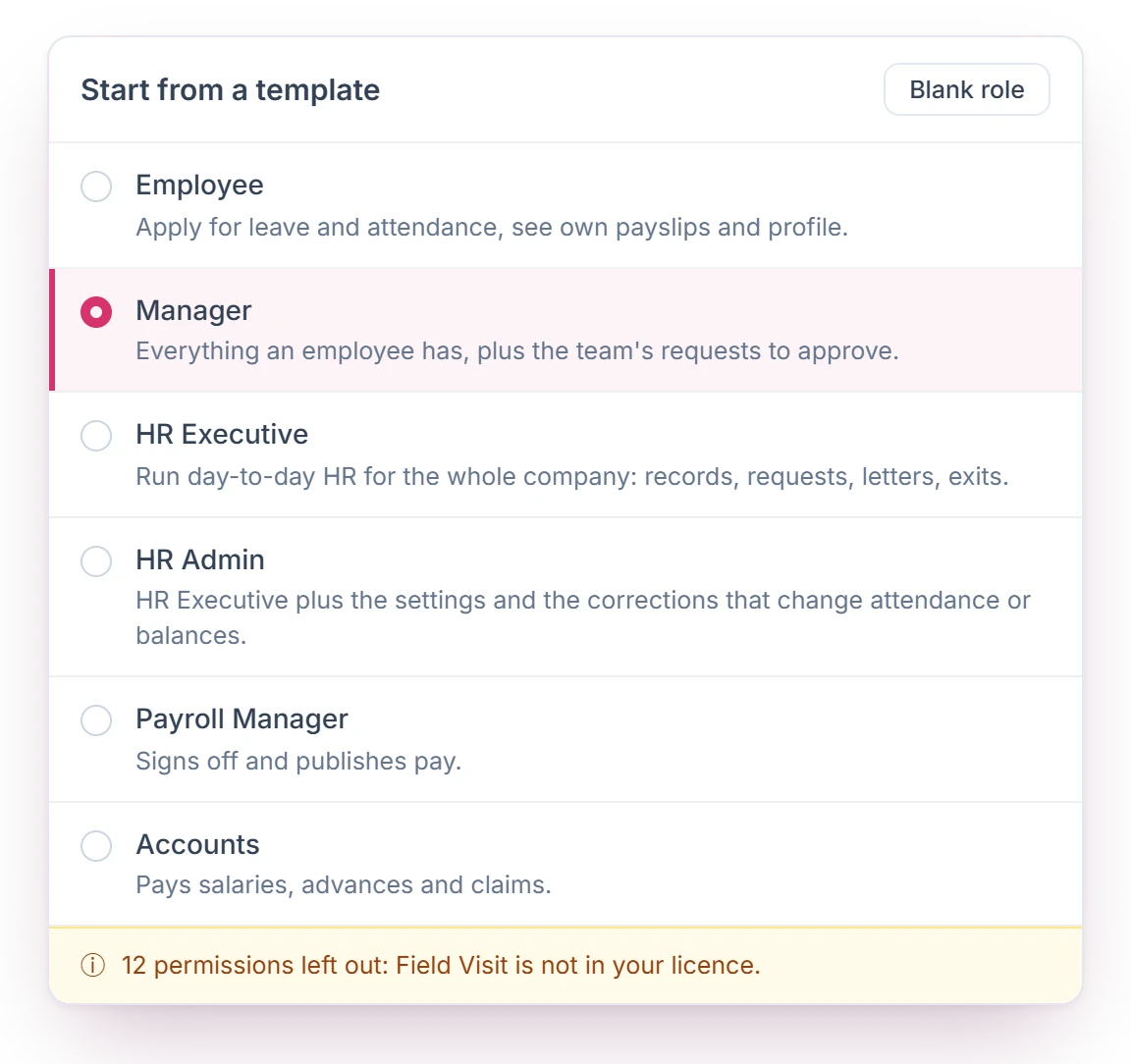
Start from ready-made roles, decide whose records each one covers, and check exactly what a person will see before you give them access.















































Every permission answers three questions.
A role is a set of answers. Change an answer and everyone holding the role changes with it.
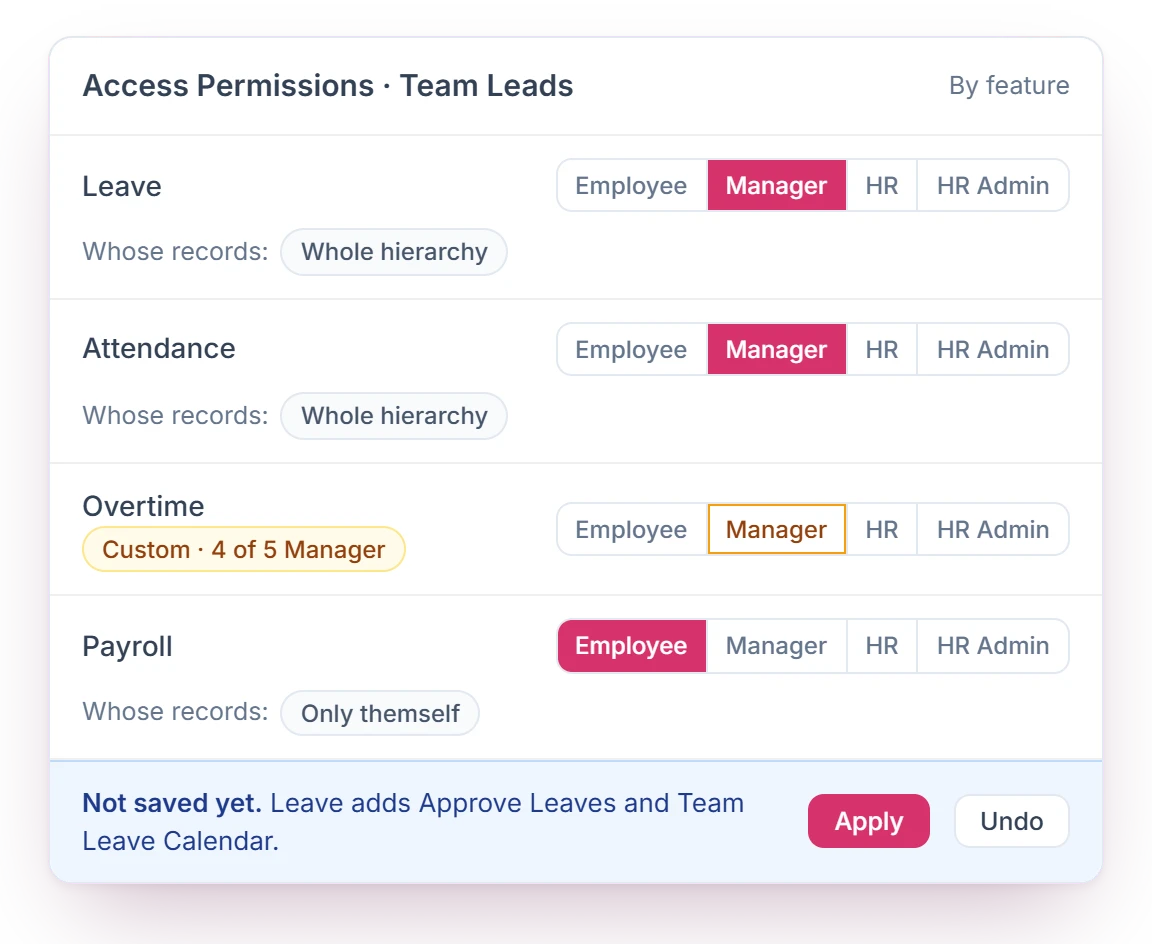
Feature and level
Each feature gets a level. Each level adds to the one before.
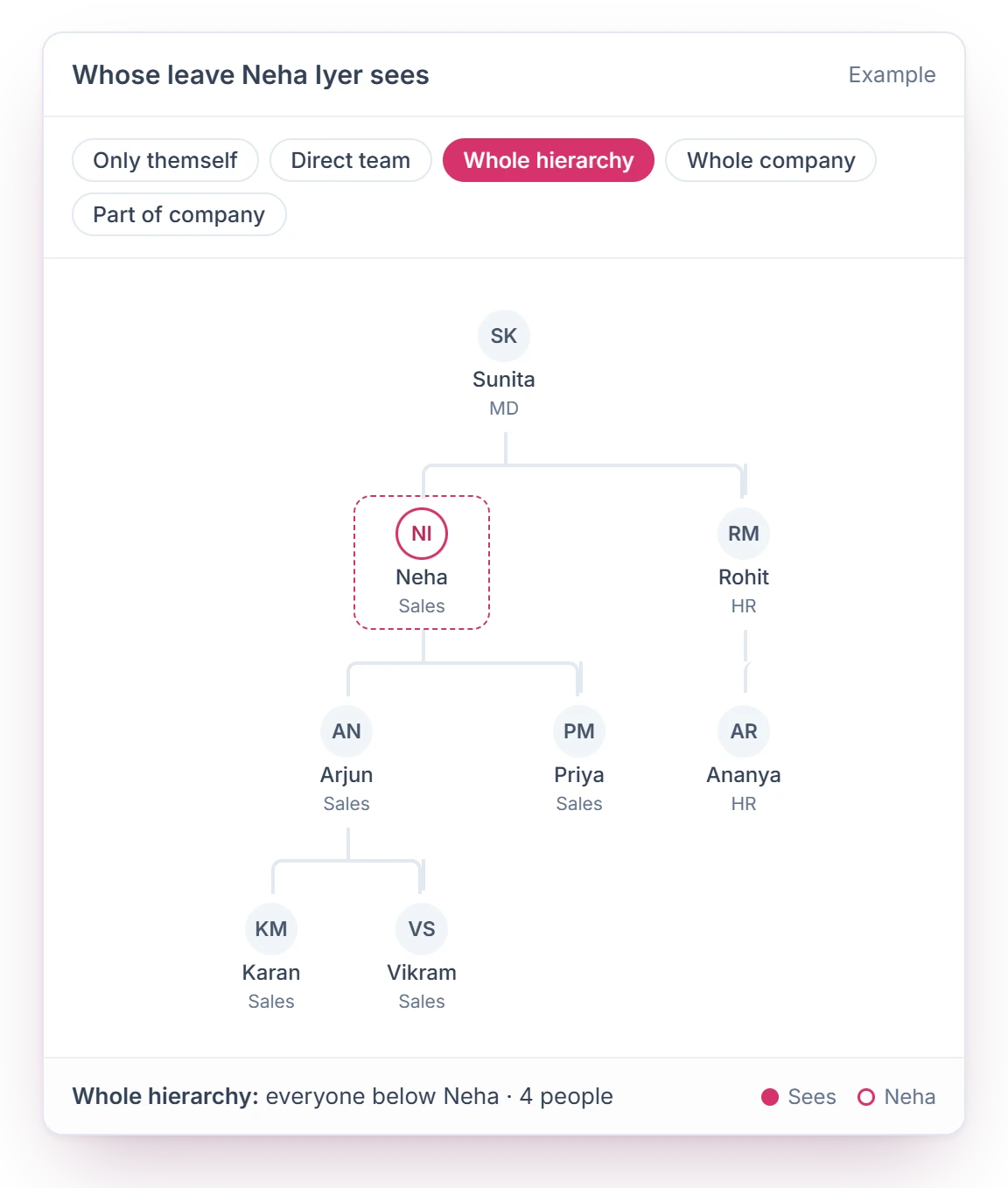
Data scope
Set once per feature. It applies to that feature's lists, reports and dashboard widgets.
Export to Excel
A separate permission on every list, so a role can see a list without downloading it.
The workflow decides
Approvers come from the workflow, never from a role tick. A request waiting with someone always reaches them.
HR workflows →“Where do we even start?”
“Can she approve leave without running payroll?”
“Should a manager see only their own team?”
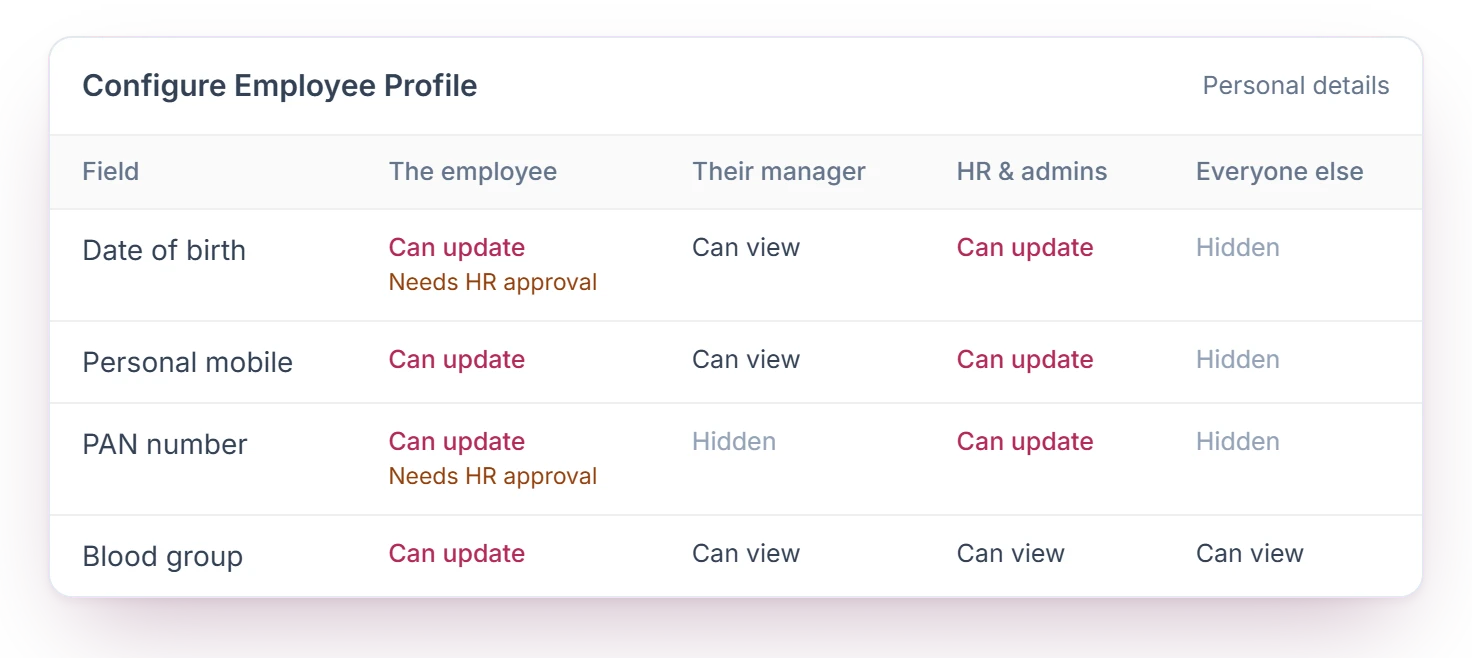
“Can his manager see his PAN number?”
“Why can he see everyone's leave?”
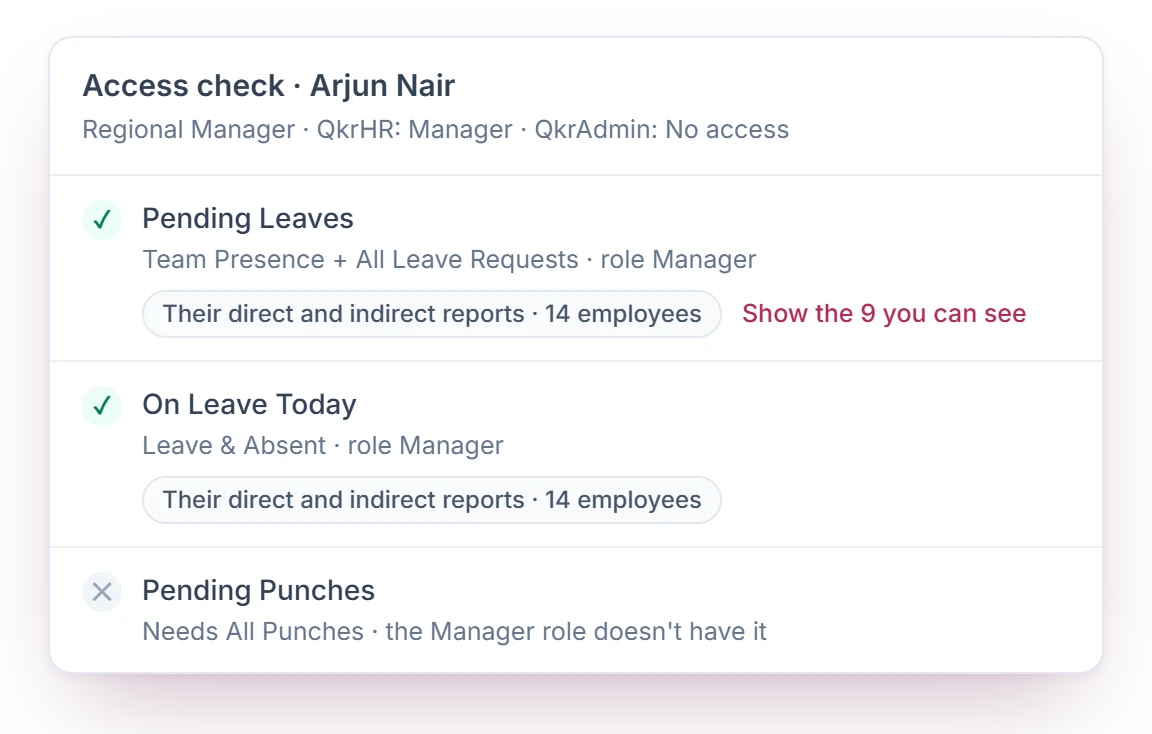
“Who can unlock attendance after payroll?”
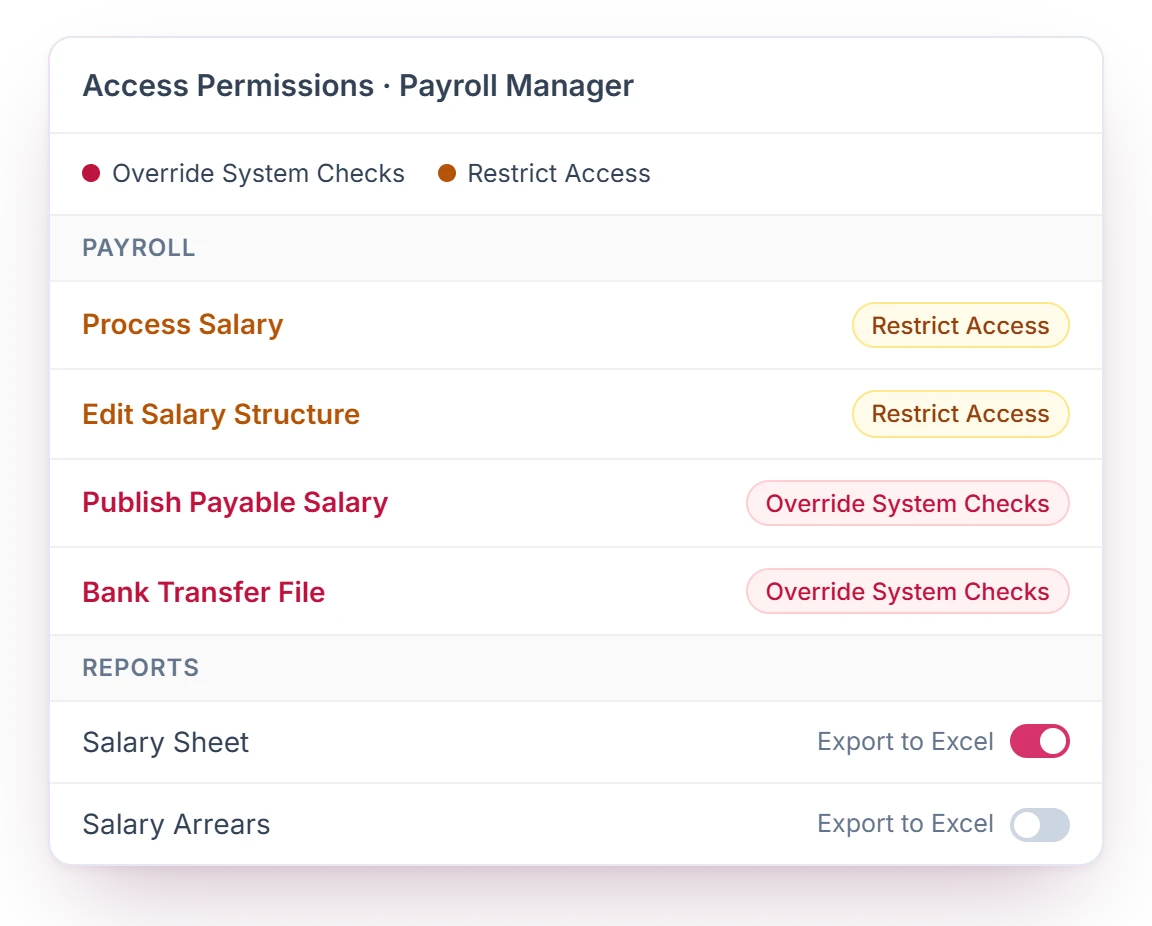
Access changes only when you change it.
- Someone joins a manager's teamDirect team and Whole hierarchy follow the reporting line, so the manager sees them without a role edit.
- A request waits with an approver outside its scopeIt still reaches them. Requests waiting with you always show in your queue.
- QkrHR adds a new screenExisting roles never get it on their own. You decide which roles should have it.
- A feature is switched off in your planIts screens are hidden from every role, not deleted, and come back as they were if it is switched on again.
- You open a role that sits between two levelsIt shows as Custom and stays exactly as it is until you pick a level.
- A level adds a screen that needs a scopeIt takes the feature's scope, so a role saved from By feature is never left without one.
- HR applies leave for an employeeOnly with Apply Leaves for Others, and their data scope decides whose leave they can apply for.
- Someone has a manager role in one app and none in anotherEach app has its own role, so a person can be a Manager in QkrHR and have no access to QkrAdmin.
The controls above are yours. This part we look after.
Your own database
Each company's data is kept in a separate database, never mixed with another customer's.
Support only with your token
Our support team opens your account with a one-time token you create. It expires on its own, and you never share a password.
Encrypted connections
Everything between your browser or phone and our servers travels over an encrypted connection.
A record of changes
Field history on every profile field, a delete history and a login trail.
One way of giving access, in every app.
Roles and data scopes work the same way in each app. Role templates and feature levels are in QkrHR.
Trusted by HR Teams Across India
Voices of Satisfaction

Roli
HR | SRSG
QkrHR has made our daily HR work so much simpler. Attendance, leave, and payroll take minutes now, not hours. It's so easy for everyone, support is quick, and our HR finally focuses on people instead of paperwork—bringing a real positive shift.

Sushant V.
Manager
QkrHR is an efficient, user-friendly HR application for daily tasks. Employees can mark attendance, apply for leave, and view balances easily. Real-time updates reduce manual processes, improve accessibility, and streamline internal workflows—making HR simpler and faster.


Pranav Goel
CEO DebtSet
QkrHR has streamlined our HR operations with a user-friendly interface and comprehensive features. Payroll, policies, and HR tasks are effortless, while integrated Field Force Management, smart workflows and customizable views save time, boost productivity, and enable smarter HR decisions.


Ashok Jade
CEO Shalimar Paints
Intec Infonet Pvt. Ltd. has carried out a really excellent and highly professional job. The team's exceptional domain and technical knowledge helped convert our requirement, which was just in the form of ideas, into a very high-end enterprise mobility solution, with real-time interface with our SAP system.
Dinesh C. Gupta
Director Capital Power
My ERP software had to be easy to use & Intec Infonet Pvt. Ltd. made that happen for me! I am dedicatedly using this software for the past 2 years & not once have I encountered any problem. It also has an impeccable support team & that’s why I recommend it to others also.

Ranjith Singh
V.P Arihant Electricals
I very much appreciate the team's efforts over these past years. Your experience and dedicated staff have really helped us in implementing the solution and provided a helping hand whenever there is a query raised.

Atal Bihari
Sales Head Vision Plus
Vision Plus Pvt Ltd has been using Qkrbiz since July 2015 and I am really impressed with the product features. We have streamlined our Sales and Services to a great extent and kudos to EFFORT for helping us achieve this. I highly recommend using this world-class product..
Vinita R.
Deputy Manager - HR, Intec Capital
Payroll used to be our most stressful process every month. With QkrHR, attendance flows directly into payroll, exceptions are highlighted automatically, and salary errors have almost disappeared. It's easily the smoothest payroll experience I've had in 5 years.
Priya
HR & Administration Manager, Help a Child Foundation
QkrPayroll significantly reduced our payroll processing time and manual effort. Attendance integration and exception handling have made month-end payroll faster, more accurate, and easier to manage.
Anjali
Manager - Human Resources, iVenture
Before QkrPayroll, payroll involved multiple spreadsheets and constant corrections. Today, payroll runs smoothly with automated calculations and minimal manual intervention, saving our HR team valuable time every month.
Questions admins ask
Haven't got your answer? Contact our support now
Bring your org chart.
We'll set up your roles in the demo and show you exactly what each person sees.