Employee Loan Management Software
Employee Loans & Advances,
Configure, Approve, Track. All in Payroll.
From loan policy setup to the final EMI — QkrPayroll manages every step inside payroll. No spreadsheets, no side-tracking, no manual deductions every month














































What Is Employee Loan Management in Payroll Software?
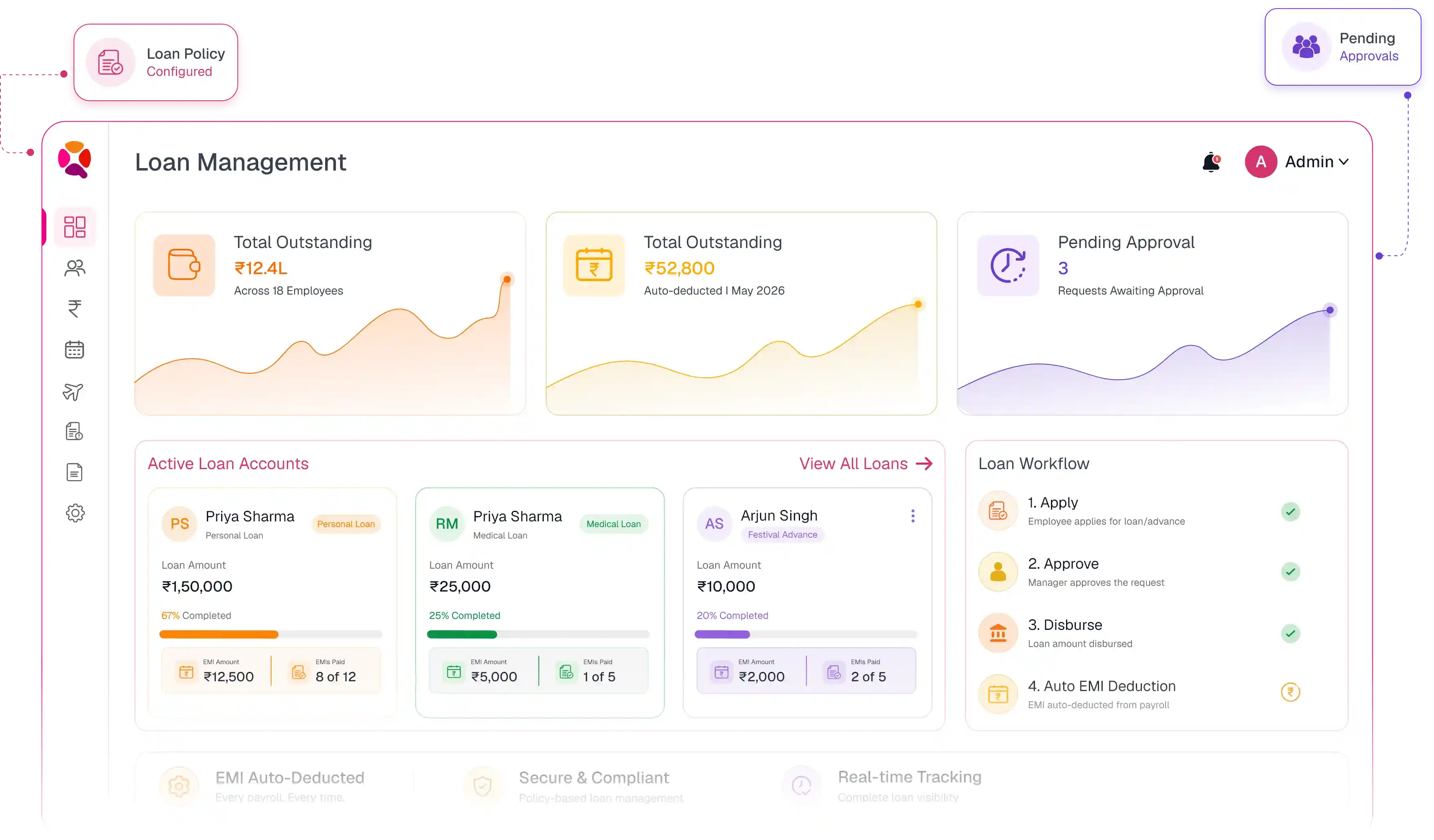
Employee loan management in payroll software is a system that handles the complete lifecycle of employee loans and advances — from policy setup and self service requests to approval workflows, payroll-integrated disbursement, and automatic EMI deductions each pay cycle. Instead of managing loans in spreadsheets and manually adjusting salaries, a payroll-integrated loan system like QkrPayroll connects loans directly to payroll — so EMIs are deducted automatically, balances update in real time, and every loan appears cleanly on the employee's payslip without any monthly HR intervention.
Four Steps from Request to Final EMI — All Automated
QkrPayroll handles every stage of the employee loan lifecycle. HR sets up the policy once — the rest runs automatically, pay cycle after pay cycle.
Employee Submits Request
Through the QkrPayroll self-service portal — on web or mobile. Employee selects loan type, enters amount, adds reason. The system shows only eligible amounts based on their grade policy — over-limit requests never reach approvers.
Approval Workflow Triggers
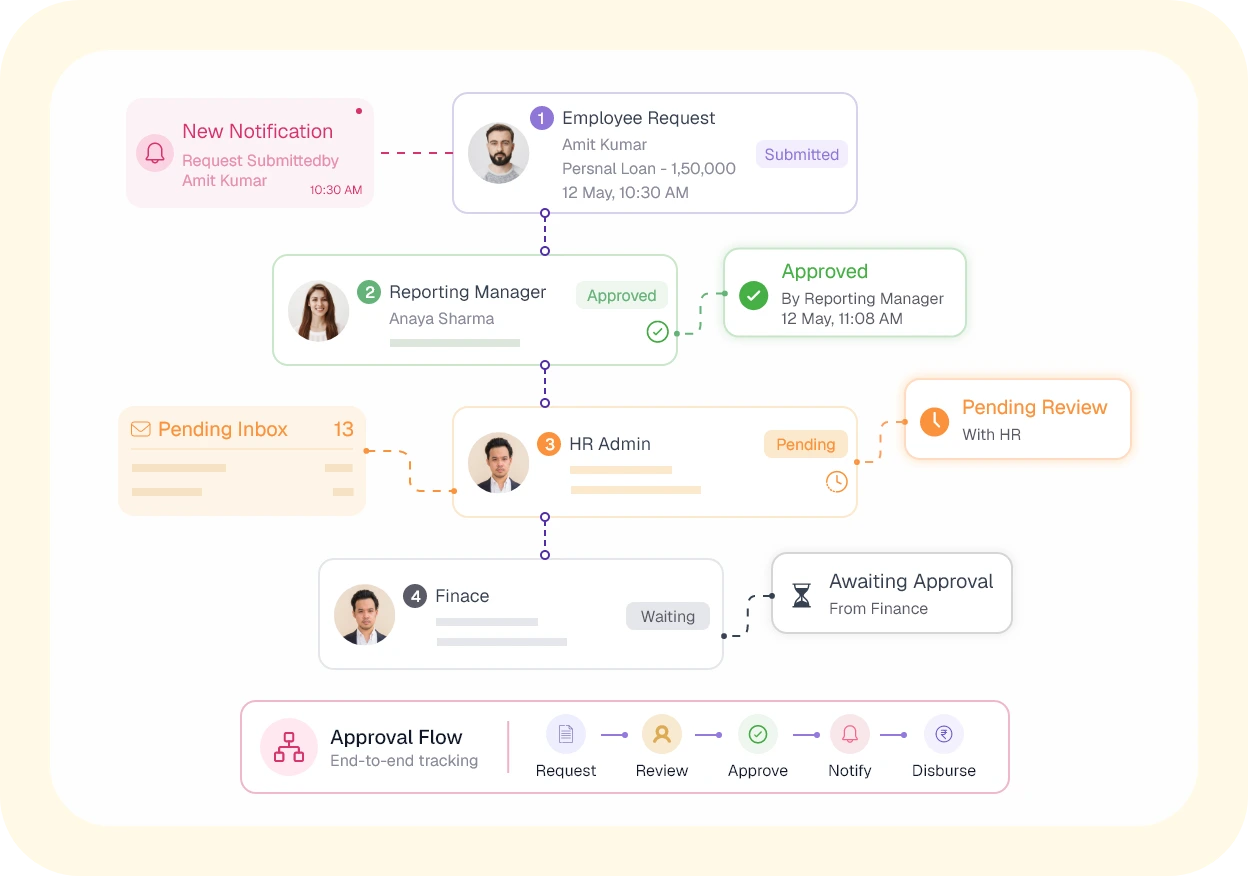
The request routes through the configured approval chain — manager, HR, and finance — with notifications at each step. Approvers act from the Pending Inbox. No email threads, no WhatsApp follow-ups, no status confusion.
Disbursement via Payroll
On final approval, the loan is disbursed through the payroll run — as a one-time salary addition — or tracked as a separate payment. The repayment schedule and EMI amount are set automatically based on the policy and approved tenure.
EMI Auto-Deducted Monthly
Every pay cycle, QkrPayroll deducts the EMI from the employee's salary without any HR action. Loan balance updates. Employee sees it clearly on their payslip. HR sees all active loans and EMI totals in the dashboard. Nothing to manage month-to month.
Set the Rules Once — QkrPayroll Enforces Them Every Time
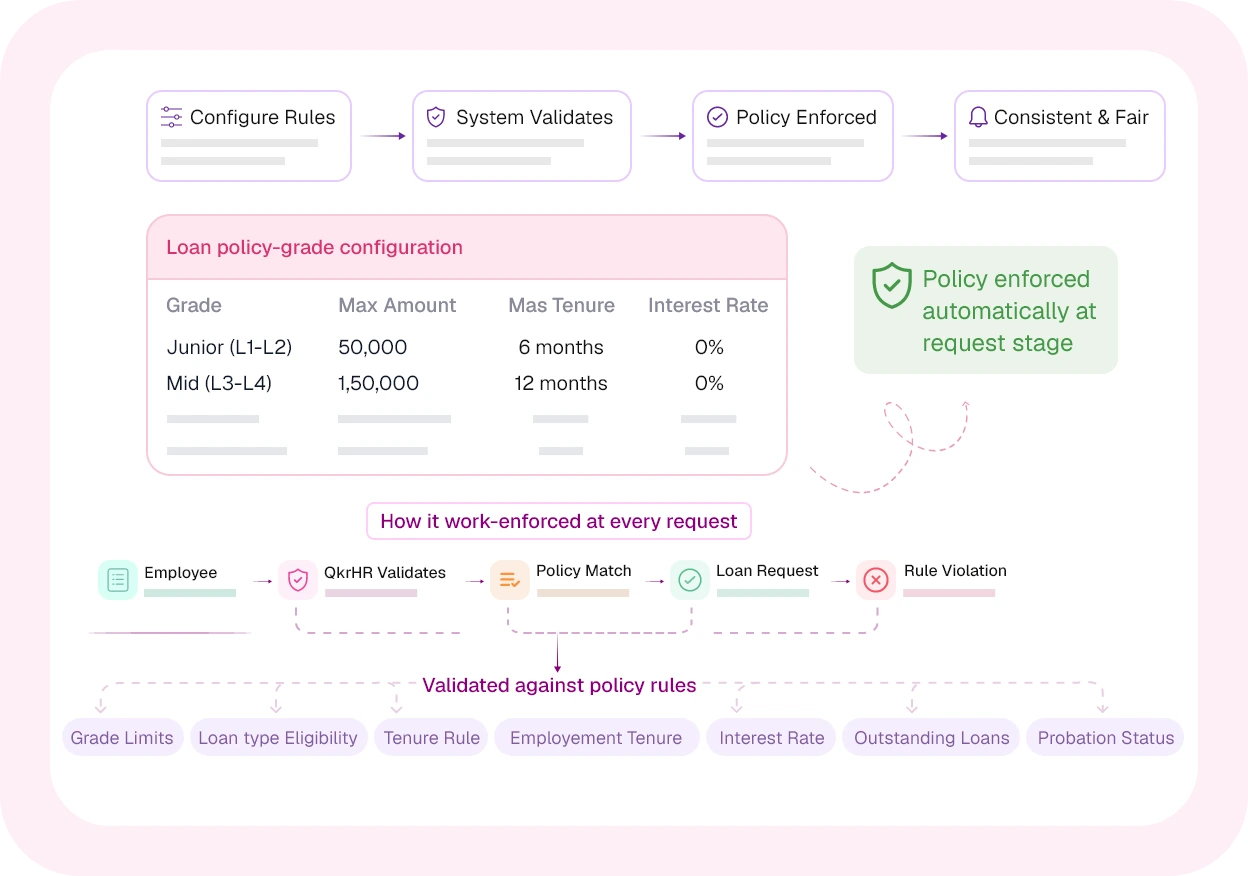
Every company has different loan rules for different employee levels. QkrPayroll lets you define loan policies by grade or department — covering eligibility, limits, loan types, and repayment terms. Once configured, the system enforces them automatically for every request.
Multi-Level Approvals — No Email Chains, No Follow-Ups
Loan requests flow through a structured, configurable approval chain. Every approver gets notified instantly and can act from their dashboard. No status ambiguity, no requests lost in inboxes.
Set It Once — EMIs Deduct Themselves Every Month
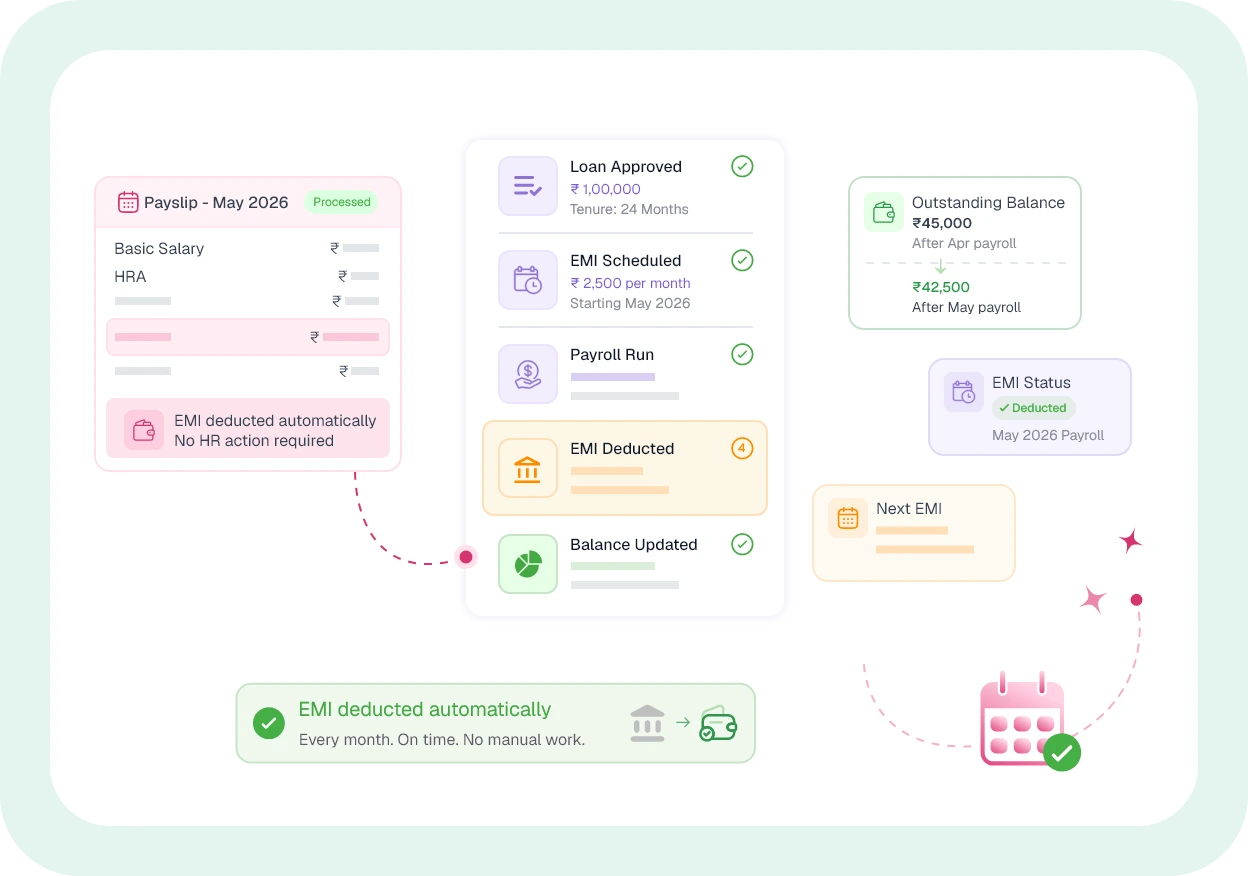
Once a loan is approved, QkrPayroll handles the rest. EMIs deduct automatically every pay cycle. Balances update in real time. Employees see it on their payslip. HR sees it in the dashboard. Nobody has to do anything manually — month after month, until the loan closes.
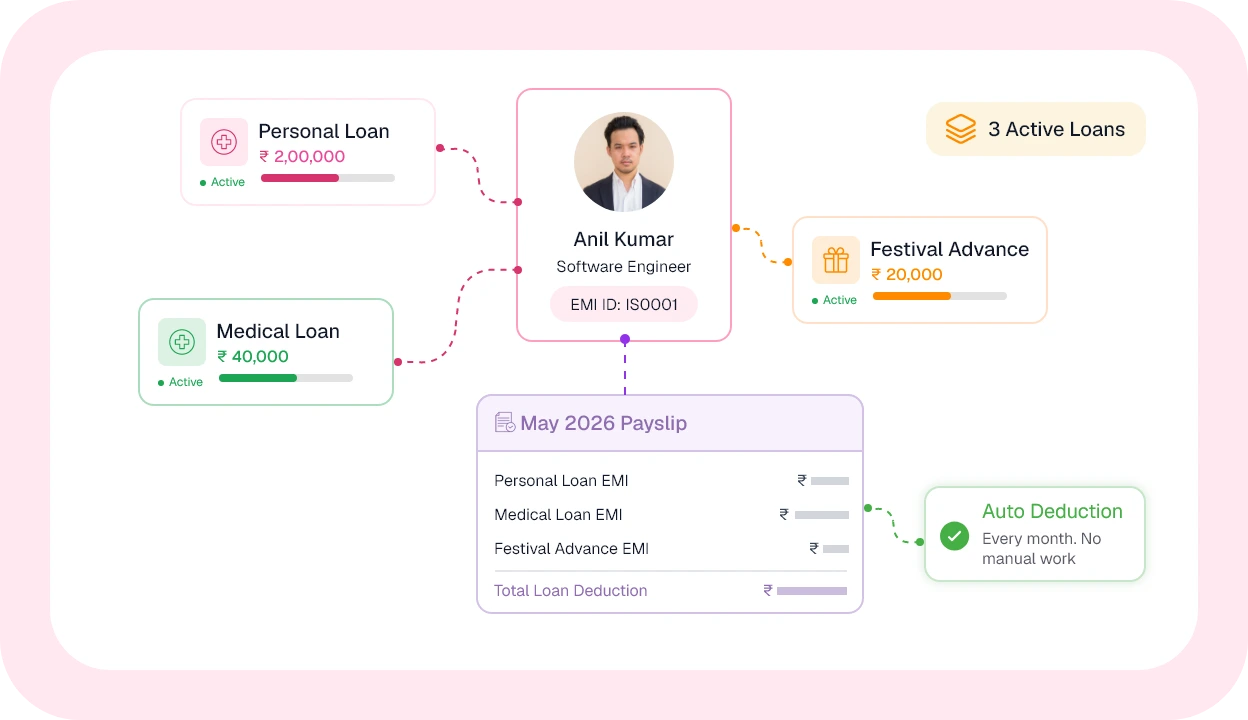
One Employee, Multiple Loans — Each Tracked Independently
Employees don't always have one financial need at a time. QkrPayroll supports multiple active loans simultaneously — each with its own repayment schedule, EMI, and outstanding balance. All deducted automatically. All visible on the payslip separately.
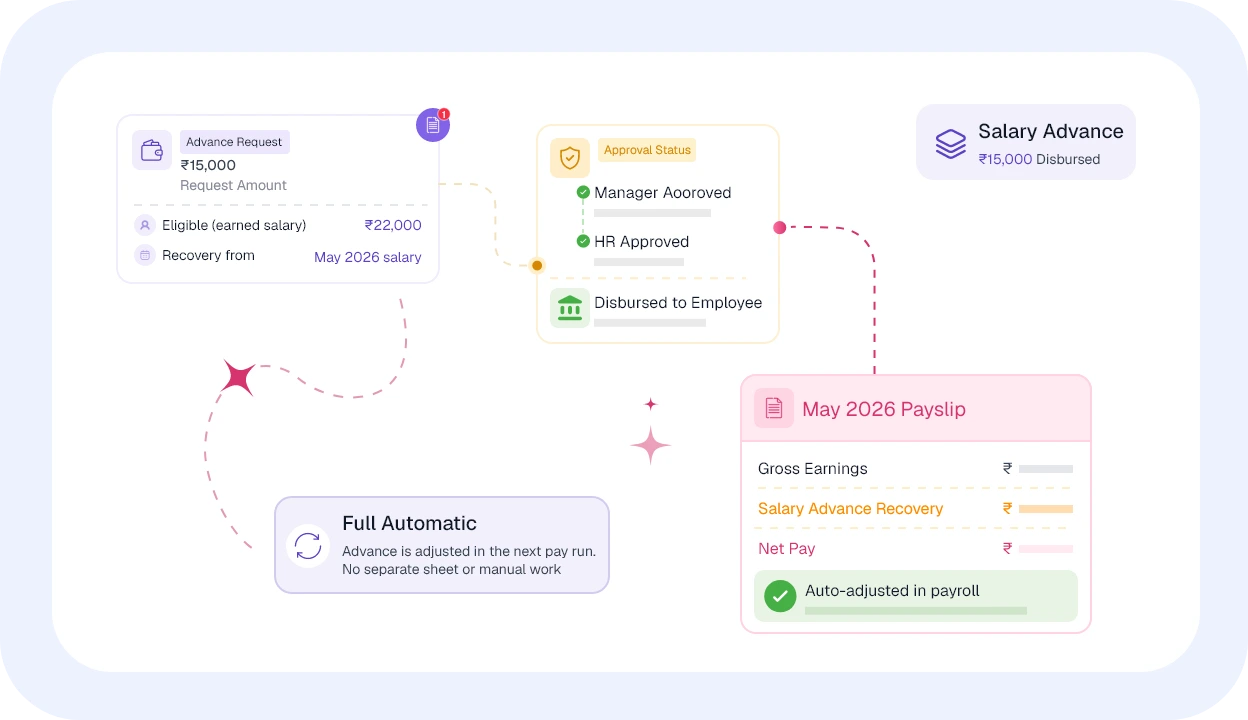
Salary Before Pay Day — Tracked and Adjusted Automatically
Sometimes employees need money before the monthly payroll date. QkrPayroll handles salary advances — including approval, disbursement, and automatic salary adjustment — without any separate reconciliation by HR or Finance.
With Interest or Without — Both Methods Supported
Many companies offer 0% interest loans as an employee benefit. Some charge nominal interest. QkrPayroll handles both — and applies the correct method automatically based on the policy.

Zero Interest (0%) — Employee Benefit
Most Indian companies offer interest-free loans as an employee welfare benefit. Configure QkrPayroll to apply 0% on any loan type. The EMI is simply the loan amount divided by tenure — clean and simple.
Example:
- ₹1,20,000 loan · 12 months · 0% interest
- EMI = ₹10,000/month flat · No interest component

Reducing Balance Method
For loans where interest applies, QkrPayroll uses the reducing balance method — interest calculated on the outstanding principal, which decreases each month as EMIs are paid. Accurate, fair, and auto-computed.
Example:
- ₹1,00,000 · 12 months · 12% p.a.
- Month 1 EMI: ₹8,885 (₹1,000 interest + ₹7,885 principal)
- Month 12 EMI: ₹8,885 (₹74 interest + ₹8,811 principal)
Know Every Filing Deadline — Never Miss One Again
QkrPayroll tracks due dates for every statutory filing. Your HR and Finance teams always know what's due, what's filed, and what's coming next.

Personal Loan
General-purpose employee loan — home repairs, family needs, or any personal financial requirement. Configurable amount and tenure per grade.
Most common
Medical Emergency Loan
For urgent medical situations — hospitalisation, surgery, or family health emergencies. Often prioritised in the approval workflow for faster processing.
Priority disbursement
Festival Advance
Seasonal employee advance for Diwali, Eid, Christmas, or other festivals. Short tenure, typically 2–5 months. Widely used across industries in India.
Short tenure
Education Loan
For employee's own further education or children's schooling fees. Typically longer tenure — up to 24 months — with higher eligibility for senior grades.
Long tenure
Vehicle Loan
Two-wheeler or four-wheeler purchase assistance. Usually available to mid and senior grade employees. Higher loan amounts with 12–24 month repayment.
Senior grades
Salary Advance
Advance against the current month's earned salary. Recovered automatically in the same or next payroll run. No tenure — single recovery.
Single month
Expense Advance
Cash advance for business travel or project expenses — before submission of actual bills. Reconciled against expense claims after the trip or project.
Expense linked
Custom Loan Type
Create any loan type specific to your industry or policy — housing, relocation, tools, uniform, or anything your workforce needs. Fully configurable.
Your policy, your typeComplete Visibility for HR and Finance — Every Report, On Demand
From outstanding balances to monthly EMI summaries, QkrPayroll gives HR and Finance every report they need — without building it manually from payslip data.

Outstanding Loan Report
Total outstanding balance per employee across all active loans — type, disbursed amount, paid amount, and remaining. Filter by department or grade.
Senior Grades
EMI Schedule per Employee
Month-wise repayment schedule for each active loan per employee — including EMI split (principal + interest, if applicable) and balance after each payment.
Employee & HR
Monthly EMI Summary
Total EMI deductions for the current payroll month across all employees — by loan type, department, or entity. Used for Finance payroll reconciliation.
Monthly
Loan Eligibility Report
Current eligibility status of all employees — whether they can apply, why they cannot (probation, existing loan limit reached), and their maximum eligible amount by grade.
HR Admin
Loan Closure Report
History of all loans closed in a period — repaid on schedule, foreclosed, or adjusted at exit. Full audit trail with approval history and disbursement dates.
Audit & Closure
Finance Liability Dashboard
Total loan liability outstanding across all employees — by entity, department, and loan type. Helps Finance plan provisions and track employee benefit costs.
Finance PlanningThree Teams. One System. Each Sees What They Need.
QkrPayroll gives employees, HR admins, and Finance teams exactly the view that serves them — without overlap or confusion.
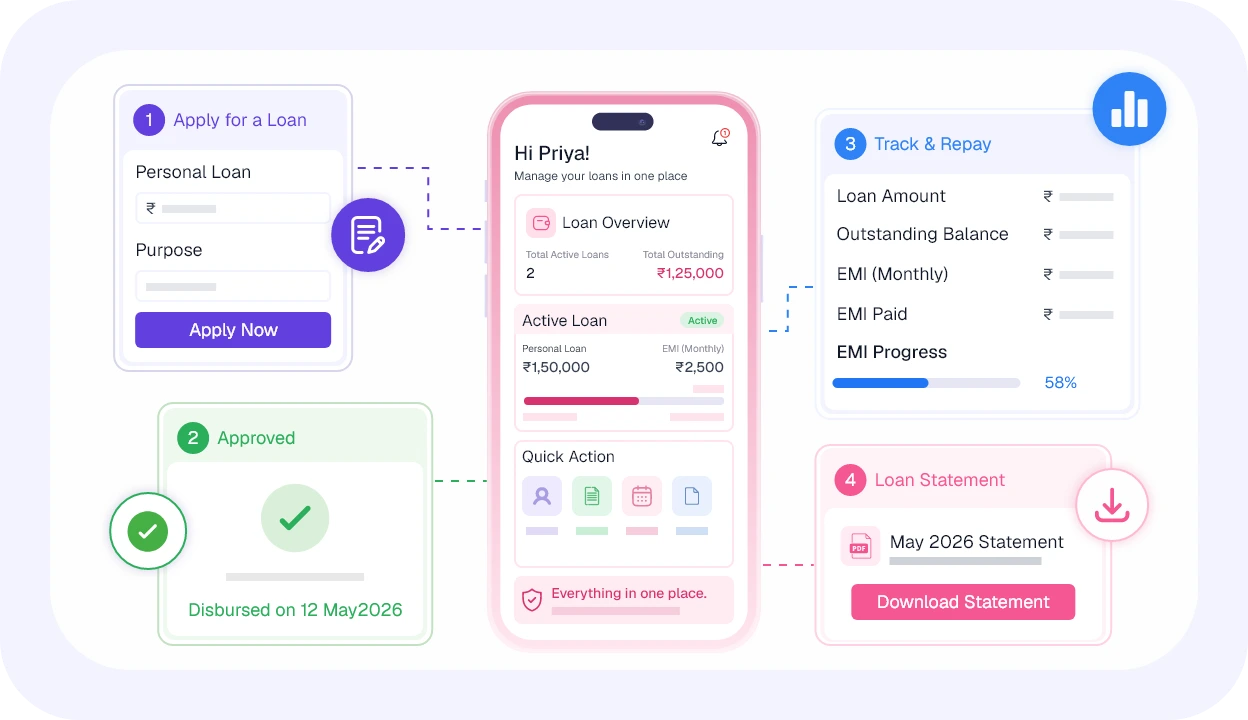
Apply, track, and repay — all from your phone.
Employees don't need to ask HR for loan status or outstanding balance. Everything is available in the QkrPayroll self-service portal — anytime, from any device.
- Apply for a loan from mobile — see eligible amount instantly
- Get notified at every approval stage — no chasing HR
- View loan statement — amount, EMI, installments paid, balance
- See all active loans in one place — personal, medical, festival
- Download full loan repayment schedule anytime
- EMI deduction visible on monthly payslip — separate line item
Trusted by HR Teams Across India
Voices of Satisfaction

Roli
HR | SRSG
QkrHR has made our daily HR work so much simpler. Attendance, leave, and payroll take minutes now, not hours. It's so easy for everyone, support is quick, and our HR finally focuses on people instead of paperwork—bringing a real positive shift.

Sushant V.
Manager
QkrHR is an efficient, user-friendly HR application for daily tasks. Employees can mark attendance, apply for leave, and view balances easily. Real-time updates reduce manual processes, improve accessibility, and streamline internal workflows—making HR simpler and faster.


Pranav Goel
CEO DebtSet
QkrHR has streamlined our HR operations with a user-friendly interface and comprehensive features. Payroll, policies, and HR tasks are effortless, while integrated Field Force Management, smart workflows and customizable views save time, boost productivity, and enable smarter HR decisions.


Ashok Jade
CEO Shalimar Paints
Intec Infonet Pvt. Ltd. has carried out a really excellent and highly professional job. The team's exceptional domain and technical knowledge helped convert our requirement, which was just in the form of ideas, into a very high-end enterprise mobility solution, with real-time interface with our SAP system.

Dinesh C. Gupta
Director Capital Power
My ERP software had to be easy to use & Intec Infonet Pvt. Ltd. made that happen for me! I am dedicatedly using this software for the past 2 years & not once have I encountered any problem. It also has an impeccable support team & that’s why I recommend it to others also.

Ranjith Singh
V.P Arihant Electricals
I very much appreciate the team's efforts over these past years. Your experience and dedicated staff have really helped us in implementing the solution and provided a helping hand whenever there is a query raised.

Atal Bihari
Sales Head Vision Plus
Vision Plus Pvt Ltd has been using Qkrbiz since July 2015 and I am really impressed with the product features. We have streamlined our Sales and Services to a great extent and kudos to EFFORT for helping us achieve this. I highly recommend using this world-class product..
Vinita R.
Deputy Manager - HR, Intec Capital
Payroll used to be our most stressful process every month. With QkrHR, attendance flows directly into payroll, exceptions are highlighted automatically, and salary errors have almost disappeared. It's easily the smoothest payroll experience I've had in 5 years.
Priya
HR & Administration Manager, Help a Child Foundation
QkrPayroll significantly reduced our payroll processing time and manual effort. Attendance integration and exception handling have made month-end payroll faster, more accurate, and easier to manage.
Anjali
Manager - Human Resources, iVenture
Before QkrPayroll, payroll involved multiple spreadsheets and constant corrections. Today, payroll runs smoothly with automated calculations and minimal manual intervention, saving our HR team valuable time every month.
Frequently Asked Questions
Haven't got your answer? Contact our support now
Support Your Team Without The Admin Overhead.
500+ Indian companies run payroll on QkrPayroll. Book a 30-minute demo — we'll walk you through a full pay run, live.