Payroll Statutory Compliance India
Statutory Compliance,
PF, ESI, TDS, PT & LWF.
QkrPayroll calculates, deducts, and files every statutory obligation automatically — at current rates, every pay cycle. No compliance specialist needed. No manual rate updates. No missed deadlines.
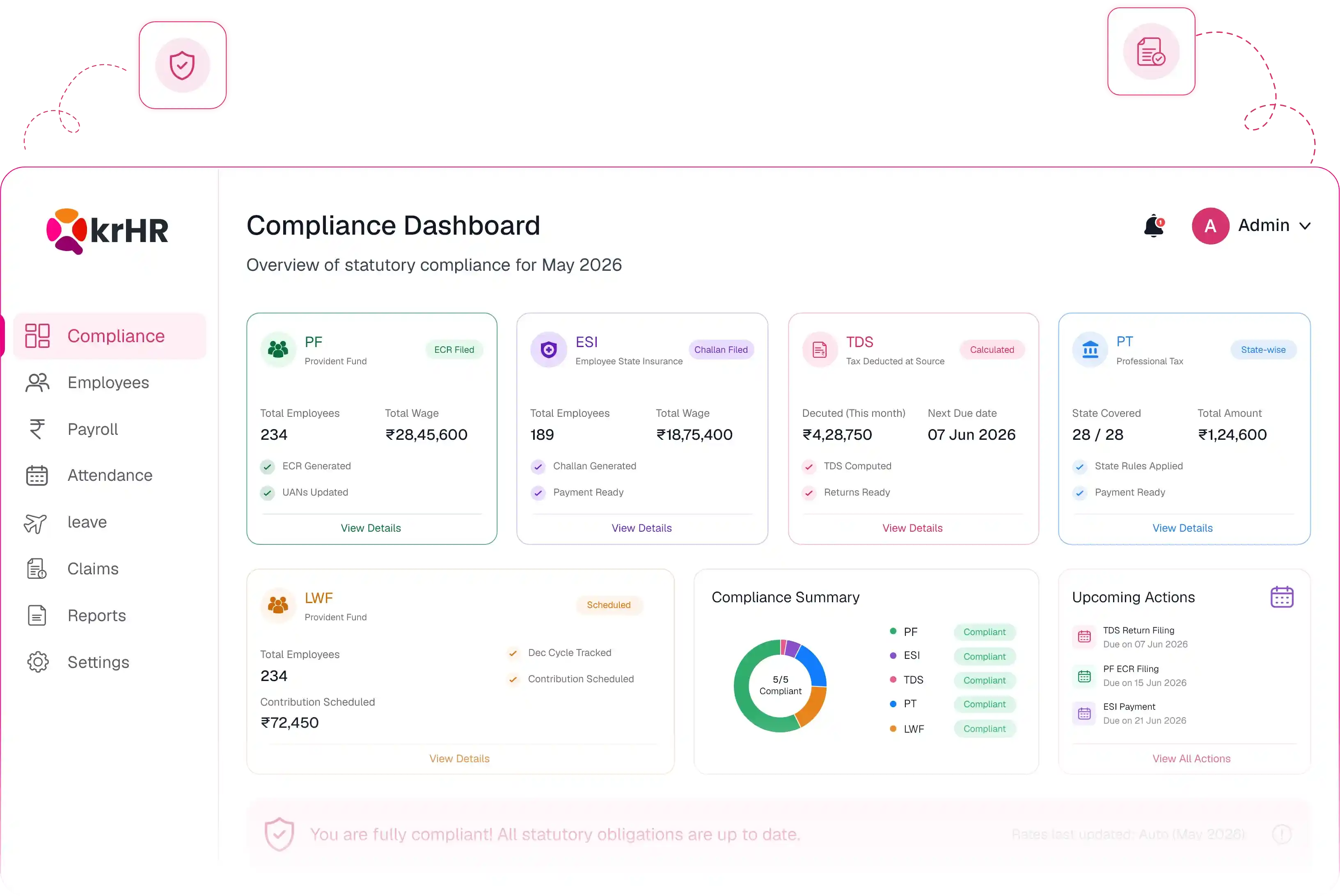














































Compliance in Three Steps - After Every Payroll Run
Every approved payroll run in QkrPayroll triggers the full compliance cycle automatically. Your team doesn't have to initiate, track, or manage any of it.
Auto-Calculate at Current Rates
As soon as attendance is locked and payroll processing begins, QkrPayroll calculates all five statutory contributions for every employee—applying their salary, work location, and tax regime. Rates are always current. No circular- hunting, no spreadsheet updates when EPFO or ESIC changes a rate.
Auto-Generate Challans & Returns
After payroll approval, QkrPayroll generates every required document automatically — PF ECR file, ESI contribution challan, PT challans (state-wise), TDS payment challan, and Form 24Q. No manual preparation. No downloading separate tools. Everything is ready to upload or submit.
Stay Always Audit-Ready
Every calculation, deduction, and filing is logged with timestamps, amounts, and the payroll run it belongs to. At any audit —internal or statutory — your complete compliance history is one export away. Nothing to reconstruct. Nothing missing. QkrPayroll makes audit prep a non-event.
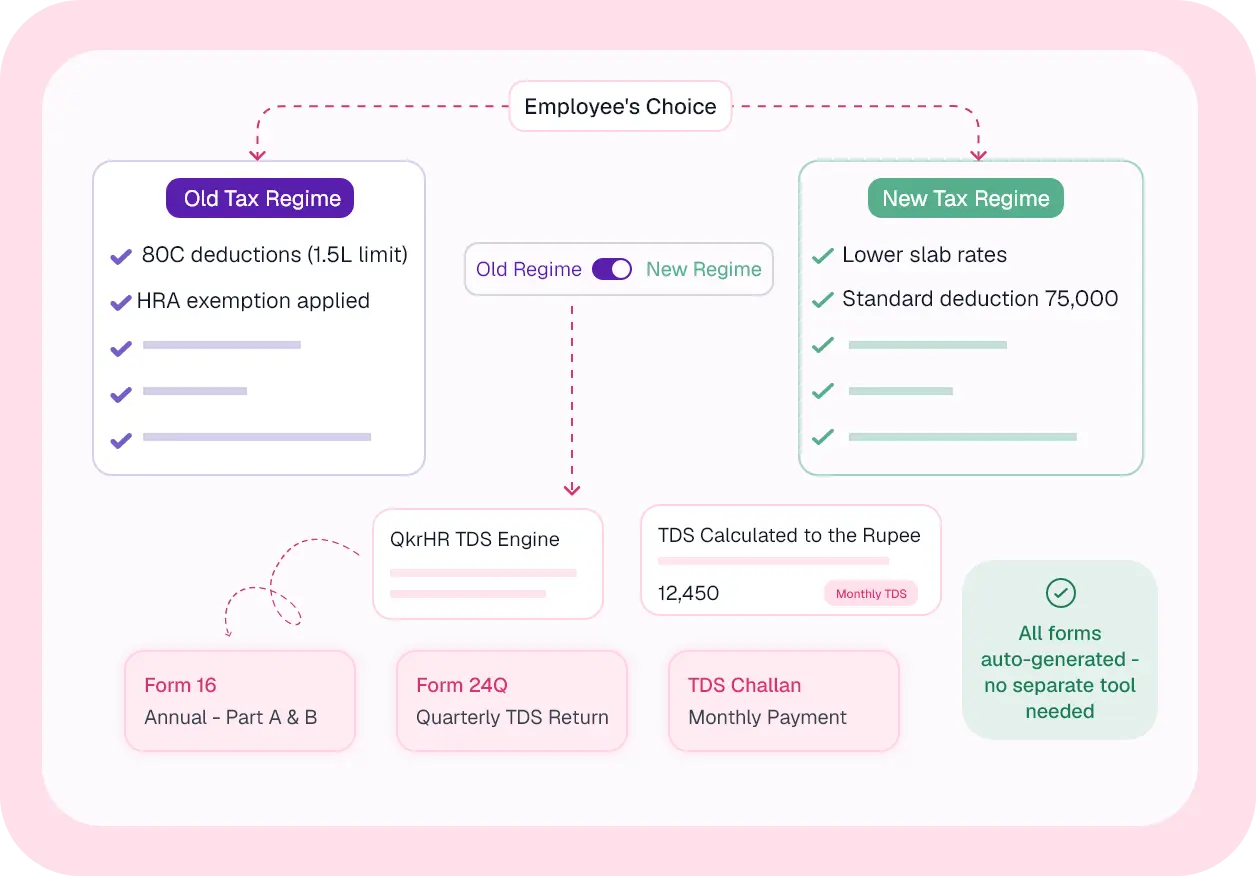
Your PF Compliance - Calculated, Filed & Reconciled Every Month
EPF is one of the most scrutinized statutory obligations in India. QkrPayroll handles every component of PF — employee deduction, employer contribution, EPS split, ECR file generation, and exemption management — without any manual intervention.
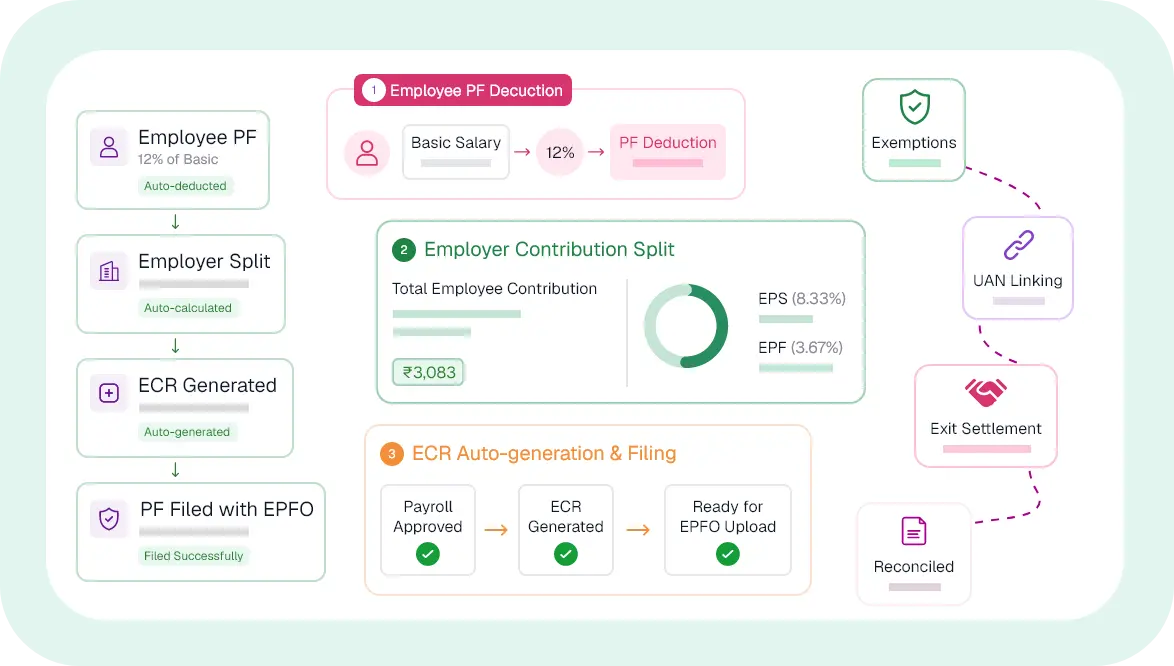
ESI Applicability Checked Per Employee - Every Cycle, Automatically
ESI is tricky because it depends on an employee's gross salary that month — not their CTC. QkrPayroll checks applicability dynamically each pay cycle, so an employee whose gross crosses ₹21,000 is handled correctly without any manual flag from HR.
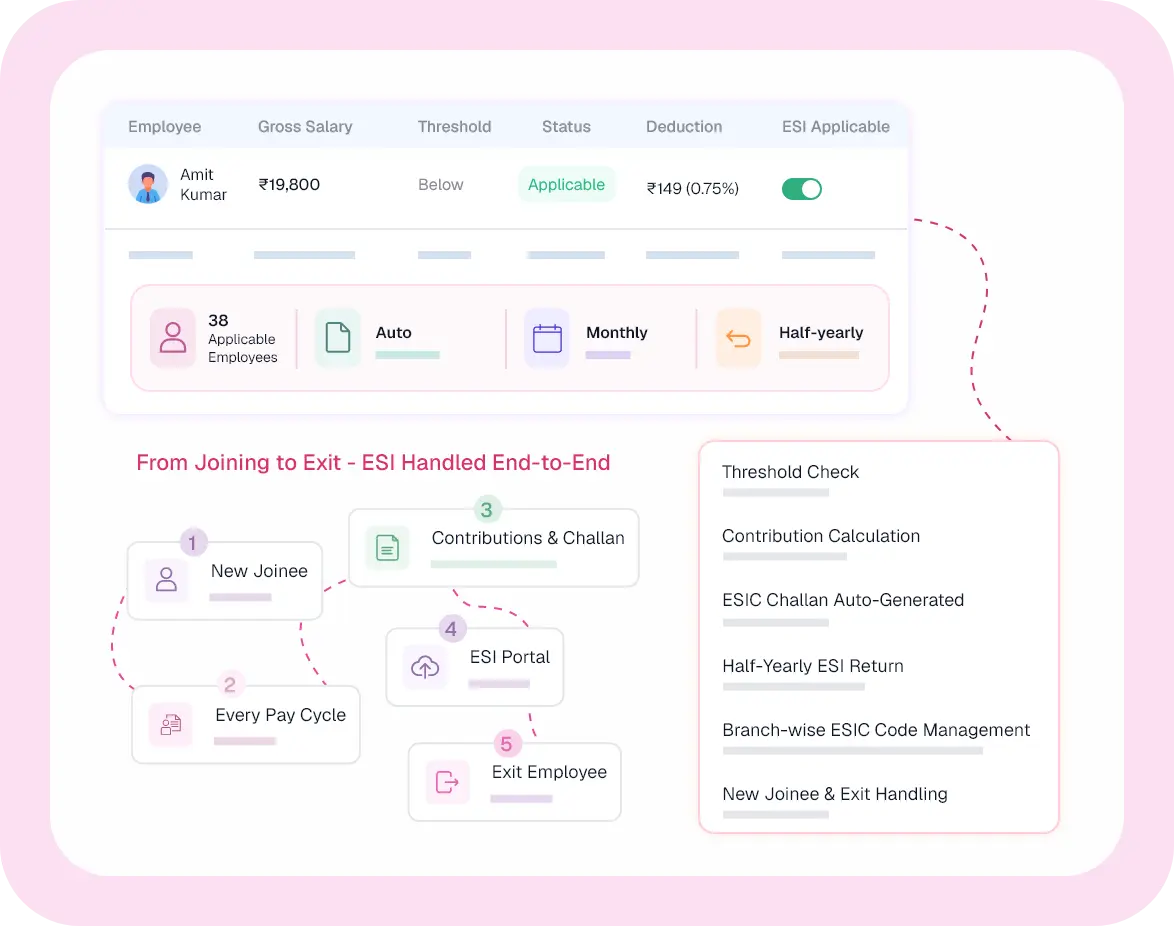
TDS Calculated to the Rupee - Old Regime, New Regime, Employee's Choice
TDS under Section 192 is the most complex statutory calculation in payroll — it depends on projected annual income, declared investments, HRA claims, and which tax regime the employee has chosen. QkrPayroll handles all of it, and generates Form 16 and Form 24Q without any manual preparation.
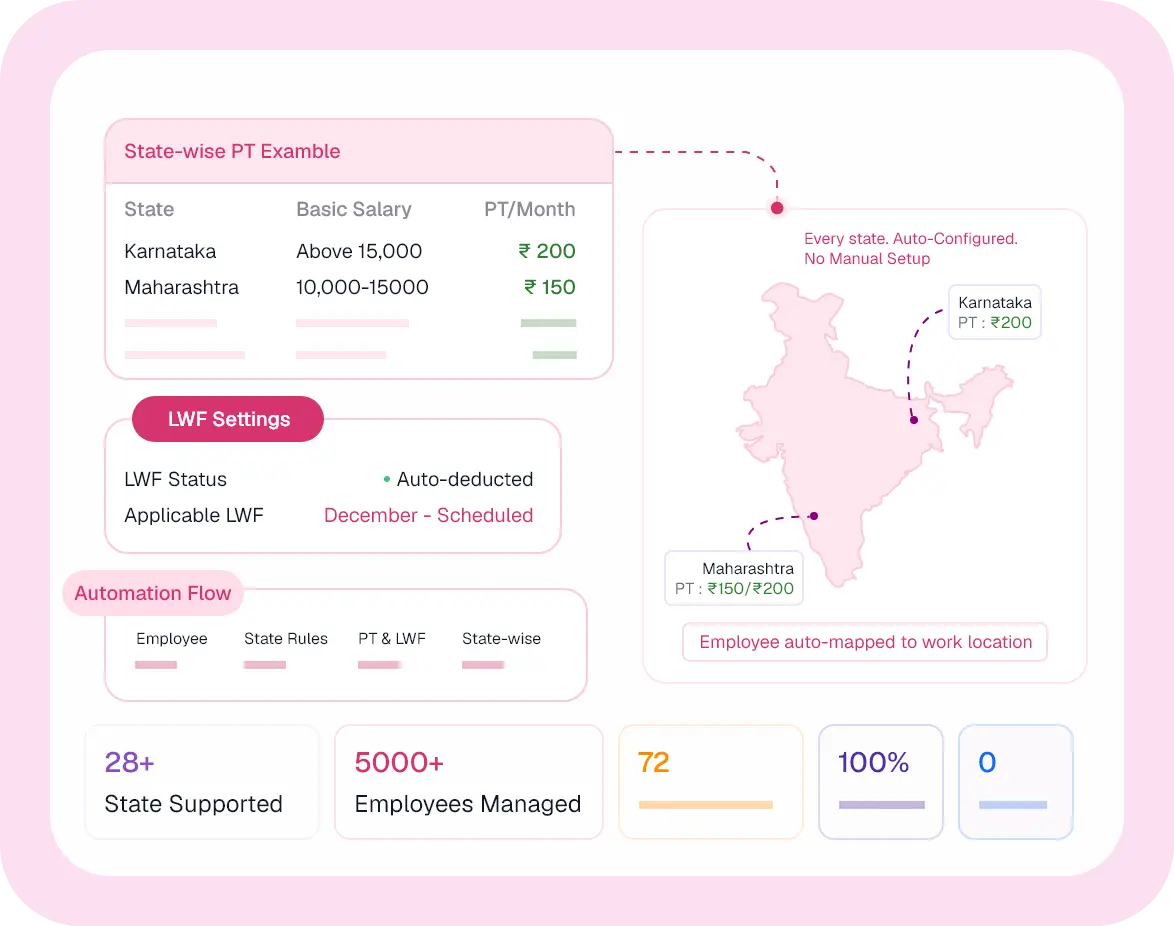
State-Wise PT and LWF - Pre-Configured, Never a Manual Update
Professional Tax rules differ by state — different slabs, different frequencies, different employer obligations. QkrPayroll has every PT-applicable state pre-configured. Just assign employees to their work location, and QkrPayroll handles the rest.
Beyond Monthly Compliance, Gratuity and Bonus, Computed Correctly
Two obligations that catch many businesses off-guard. QkrPayroll computes both correctly, every time, based on current law.

Gratuity
Payable to employees completing 5+ years of continuous service under the Payment of Gratuity Act, 1972. QkrPayroll calculates gratuity based on last drawn basic salary and completed years — accurately, without manual formula application.
- Formula: (Last basic salary × 15 × years served) ÷ 26
- Triggered automatically at employee exit after 5 years
- Gratuity liability report for finance planning

Statutory Bonus
Under the Payment of Bonus Act, 1965, employees earning up to ₹21,000/month are entitled to a minimum 8.33% bonus on ₹7,000 (or minimum wage, whichever is higher). QkrPayroll computes eligibility and bonus amounts during the annual cycle without manual calculation.
- Eligibility check: employees ≤ ₹21,000/month gross
- Minimum 8.33% — maximum 20% based on allocable surplus
- Paid directly through payroll in the applicable month
Every Document, Auto-Generated After Every Payroll Run
No more downloading separate tools, running reports manually, or building Excel challans. Every filing document is ready in QkrPayroll the moment payroll is approved.
PF ECR Challan
Monthly · After payroll approval
As soon as attendance is locked and payroll processing begins, QkrPayroll calculates all five statutory contributions for every employee — applying their salary, work location, and tax regime. Rates are always current. No circular-hunting, no spreadsheet updates when EPFO or ESIC changes a rate.
✓ Auto-generatedESI Contribution Challan
Monthly · Per ESIC sub-code
ESI challan with employee and employer contribution breakdowns, formatted for ESIC online portal upload. Branch-wise if applicable.
✓ Auto-generatedTDS Payment Challan
Monthly · Section 192 payment
Monthly TDS challan (ITNS 281) showing total TDS deducted across all employees for the month — ready for online tax payment.
✓ Auto-generatedForm 24Q — TDS Return
Quarterly · Q1 to Q4
Quarterly TDS statement for salaries — including all deductions, employee-wise TDS amounts, and PAN details — ready for TRACES filing.
✓ Auto-generatedForm 16 — Part A & B
Annual · Financial year end
Complete Form 16 for every employee — Part A (TDS certificate from TRACES) and Part B (salary breakup and deductions). Auto-distributed via employee portal.
✓ Auto-generatedProfessional Tax Challans
Monthly / Quarterly · Per state
State-specific PT challans generated per applicable state based on employee work locations. Multi-state businesses get each challan independently.
✓ Auto-generatedAlways Audit-Ready, Nothing to Reconstruct, Nothing Missing
Most payroll compliance headaches come from audits — scrambling for records, reconciling challans, proving filings were made on time. QkrPayroll keeps everything indexed and exportable from day one.
Always Audit-Ready, Nothing to Reconstruct, Nothing Missing
Most payroll compliance headaches come from audits — scrambling for records, reconciling challans, proving filings were made on time. QkrPayroll keeps everything indexed and exportable from day one.

Complete Compliance History
Every statutory calculation, deduction, and challan is stored with the payroll run it belongs to. Filter by period, employee, or compliance type. Export in seconds.

Timestamped Filing Records
Every challan generation, payroll approval, and rate application is timestamped with who did it and when. The audit trail is complete and tamper-evident.

Statutory Liability Reports
Month-wise and year-wise liability summaries for PF, ESI, TDS, PT, and LWF — for both HR reconciliation and Finance ledger matching. One-click export.

Rate Change Log
Every time a statutory rate is updated in QkrPayroll, the change is logged with the effective date. You always know which rate applied to which pay cycle — no ambiguity during audits.

Employee-Level Drill-Down
For any employee, at any point in time — see the exact PF, ESI, TDS, and PT deducted, the challan it was part of, and the payroll run it came from. Audit answers in seconds.

Secure, Role-Restricted Access
Compliance records are accessible to Finance and HR admins based on their role. Auditors can be given read-only access to specific periods — no full database exposure needed.
Trusted by HR Teams Across India
Voices of Satisfaction

Roli
HR | SRSG
QkrHR has made our daily HR work so much simpler. Attendance, leave, and payroll take minutes now, not hours. It's so easy for everyone, support is quick, and our HR finally focuses on people instead of paperwork—bringing a real positive shift.

Sushant V.
Manager
QkrHR is an efficient, user-friendly HR application for daily tasks. Employees can mark attendance, apply for leave, and view balances easily. Real-time updates reduce manual processes, improve accessibility, and streamline internal workflows—making HR simpler and faster.


Pranav Goel
CEO DebtSet
QkrHR has streamlined our HR operations with a user-friendly interface and comprehensive features. Payroll, policies, and HR tasks are effortless, while integrated Field Force Management, smart workflows and customizable views save time, boost productivity, and enable smarter HR decisions.


Ashok Jade
CEO Shalimar Paints
Intec Infonet Pvt. Ltd. has carried out a really excellent and highly professional job. The team's exceptional domain and technical knowledge helped convert our requirement, which was just in the form of ideas, into a very high-end enterprise mobility solution, with real-time interface with our SAP system.

Dinesh C. Gupta
Director Capital Power
My ERP software had to be easy to use & Intec Infonet Pvt. Ltd. made that happen for me! I am dedicatedly using this software for the past 2 years & not once have I encountered any problem. It also has an impeccable support team & that’s why I recommend it to others also.

Ranjith Singh
V.P Arihant Electricals
I very much appreciate the team's efforts over these past years. Your experience and dedicated staff have really helped us in implementing the solution and provided a helping hand whenever there is a query raised.

Atal Bihari
Sales Head Vision Plus
Vision Plus Pvt Ltd has been using Qkrbiz since July 2015 and I am really impressed with the product features. We have streamlined our Sales and Services to a great extent and kudos to EFFORT for helping us achieve this. I highly recommend using this world-class product..
Vinita R.
Deputy Manager - HR, Intec Capital
Payroll used to be our most stressful process every month. With QkrHR, attendance flows directly into payroll, exceptions are highlighted automatically, and salary errors have almost disappeared. It's easily the smoothest payroll experience I've had in 5 years.
Priya
HR & Administration Manager, Help a Child Foundation
QkrPayroll significantly reduced our payroll processing time and manual effort. Attendance integration and exception handling have made month-end payroll faster, more accurate, and easier to manage.
Anjali
Manager - Human Resources, iVenture
Before QkrPayroll, payroll involved multiple spreadsheets and constant corrections. Today, payroll runs smoothly with automated calculations and minimal manual intervention, saving our HR team valuable time every month.
Frequently Asked Questions
Haven't got your answer? Contact our support now
Never Fear a Compliance Audit Again.
500+ Indian companies run payroll on QkrPayroll. Book a 30-minute demo — we'll walk you through a full pay run, live.