Employee Offboarding
Employee Offboarding That's Clear,
Flexible & Error-Free.
Fix employee offboarding once and for all — with a system built for real-world complexity. QkrHR handles every aspect of the offboarding process automatically, so nothing falls through the cracks.
What Employee Offboarding
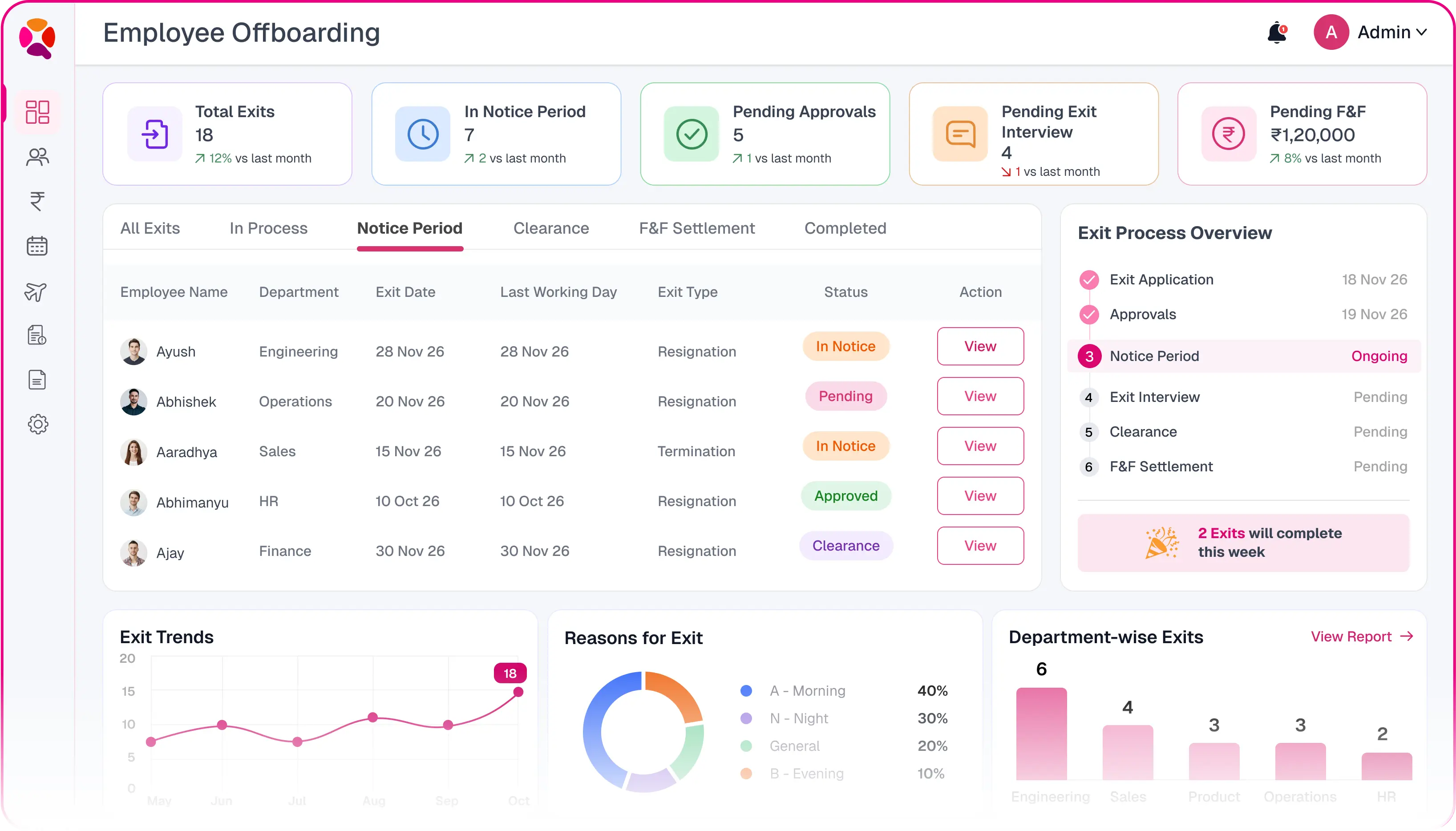
Software Covers in QkrHR
Employee offboarding software manages everything that happens when someone leaves: the exit record, approvals, notice, feedback, clearance and the final settlement. In QkrHR these six parts are one flow, not six trackers.

Exit applications
Raised by the employee, the manager or HR, with the reason and intended last working day.

Approvals and withdrawals
Your approval chain runs on every resignation. Employees can withdraw where policy allows.

Notice period tracking
Everyone serving notice on one dashboard, with leave rules applied automatically.

Exit interviews
Sent on time, kept confidential, and grouped into attrition trends.

Clearance checklist
IT, Finance, Admin and managers each get their tasks, owners and due dates.

Full & final settlement
Everything owed both ways, netted to one figure and paid on the legal clock.
Two Ways an Employee Leaves.
QkrHR Handles Both.
Not every exit comes with a resignation letter. QkrHR gives HR one flow for planned exits with notice and another for people who have already gone, so the record is never forced into the wrong shape.
Immediate exit
No approval neededThe employee has already left, absconded or was let go on the spot. HR records the exit directly.
- 1Employee leavesNo notice in the system
- 2HR processes exitOne stop, no workflow
- 3LWD capturedAs part of the exit
Notice Period Exit
Approval workflowThe employee resigns and serves notice. QkrHR runs your approval chain, tracks the notice and HR confirms the last working day.
- 1Exit applicationBy employee, manager or HR
- 2Approved & notice servedLeave rules applied automatically
- 3LWD confirmedHR confirms the actual last day
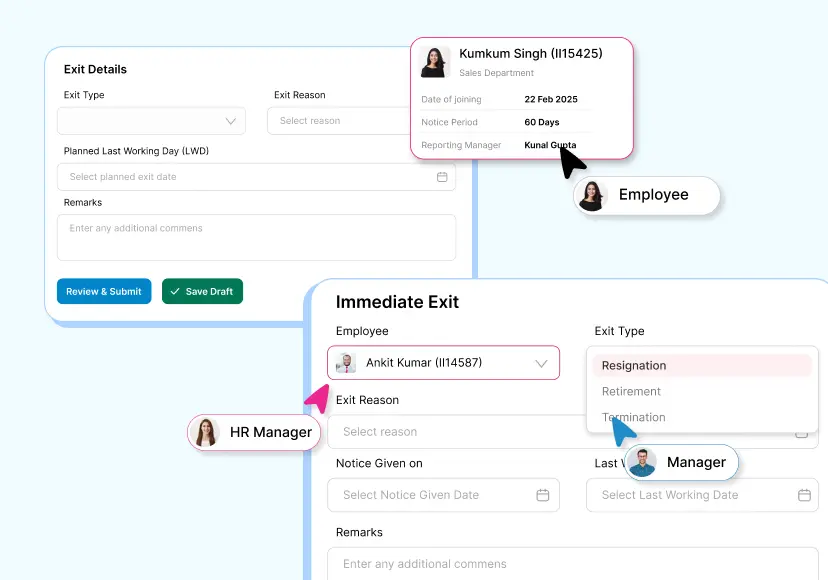
Exit Applications From the Employee, the Manager or HR
A resignation usually starts in a conversation, not a form. QkrHR gives you three ways to put it on record, so the exit begins the same way whoever raises it.
- Self-resignation from the employee's own portal or mobile app.
- Manager-initiated when the employee has resigned verbally but not logged it.
- HR-initiated for terminations, role eliminations and contract ends.
- The intended last working day is checked against the notice period set for the legal entity, such as 30, 60 or 90 days.
- A categorised reason for leaving, notes and attachments like a resignation letter are captured on the same form.
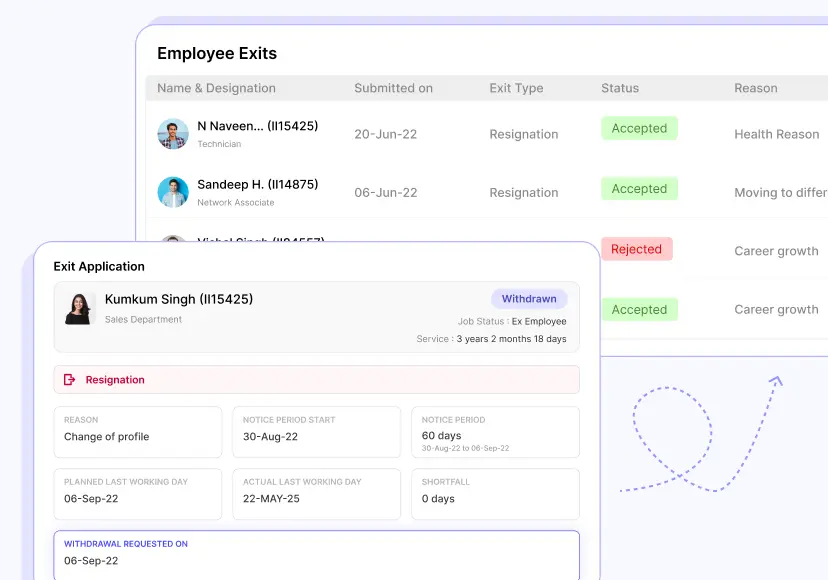
Resignation Approvals That Keep Moving
Every exit application runs through the approval chain you set up, typically reporting manager, then department head, then HR. Each approver can approve, ask for changes or reject, and the employee can see exactly who has it.
- Live status for the employee: Pending, Under Review, Approved, On Hold or Rejected.
- Withdrawal before approval or before notice begins, where your policy allows it.
- Leave and work-from-home requests dated after the planned exit date are rejected automatically, with a system remark on each.
- Leave types you mark as not allowed during notice are blocked from the day notice starts.
Everyone Serving Notice, on One Dashboard
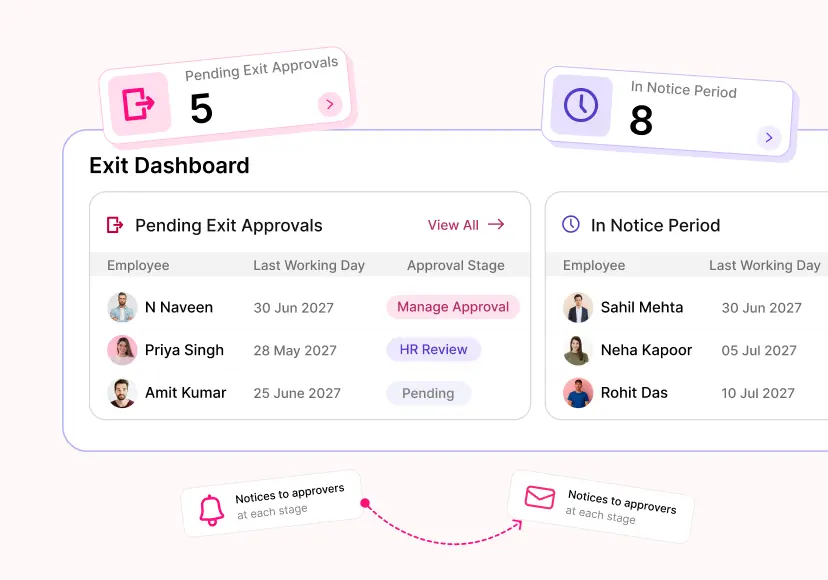
The Team Dashboard shows two queues HR and managers need during any exit: resignations waiting for a decision, and people already serving notice with their last working day. Replacement hiring and handovers can start from the same screen.
- Pending Exit Approvals lists each application with the intended last day and where it sits in approval.
- In Notice Period lists everyone serving notice, their last working day and acceptance status.
- Notices to approvers go out at each stage, and employee notifications follow the templates you configure.
Exit Interviews That Reach the Right People
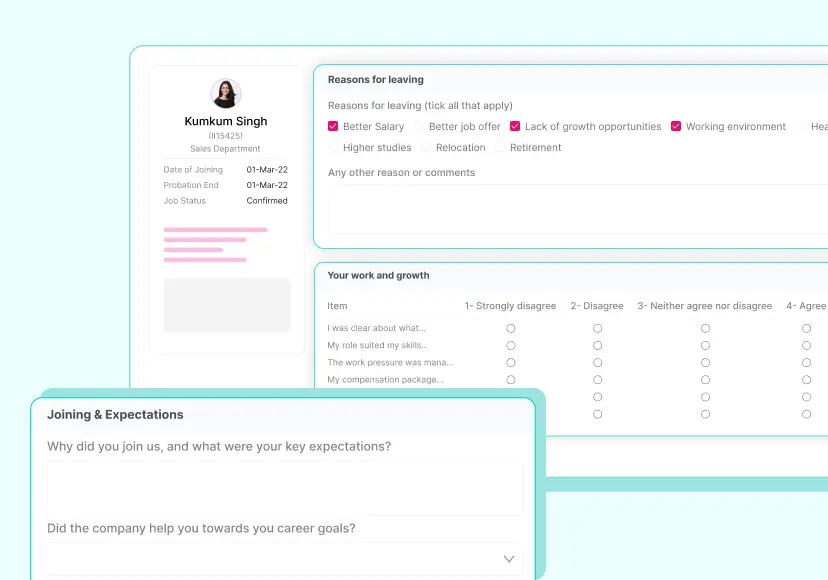
People leaving are often the most candid voices in the company. QkrHR sends the exit interview automatically, for example 15 days before the planned exit date, and keeps the answers where only HR can read them unless you decide otherwise.
- Submit-only form when exit interviews are for trend data.
- Review form that routes each response to reviewers, such as the reporting manager and HR head, who can approve or ask for clarification but cannot edit answers.
- Build your own questions: reason for leaving, manager, growth, pay, work environment, suggestions.
- Responses stay on the employee record after the profile is archived and roll up into exit-reason trends by department.
Exit Clearance Checklist Across Every Department
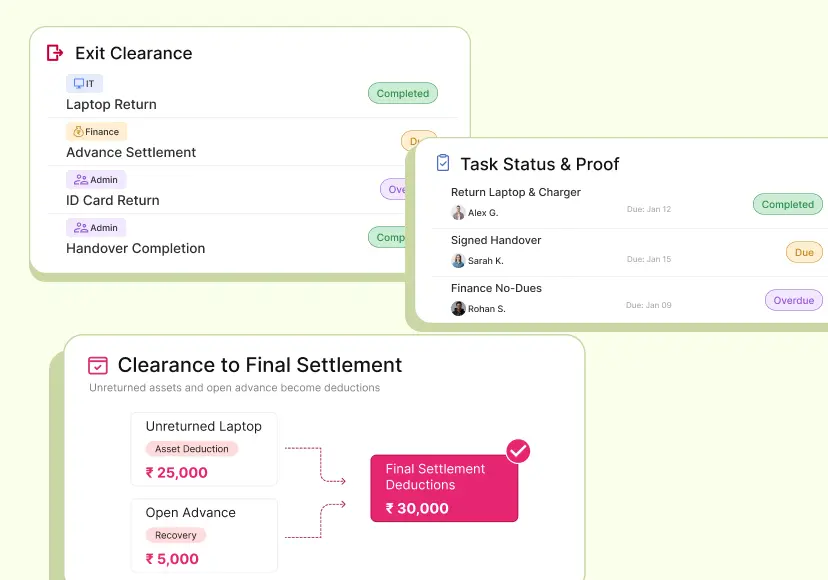
A clean exit needs IT, Finance, Admin and the manager to each finish their part. QkrHR applies a clearance checklist to every approved exit, gives each task an owner and a due date, and puts one process owner in charge of chasing it.
- Due dates anchor to the day the exit was notified, the planned exit date or the last working day, task by task.
- Task status at a glance: Not Due, Due, Overdue or Completed.
- Assignees attach proof: signed handovers, asset receipts, no-dues certificates.
- Unreturned assets and open advances flow into the full & final settlement as deductions.
Confirm the Last Working Day Once, and Everything Follows
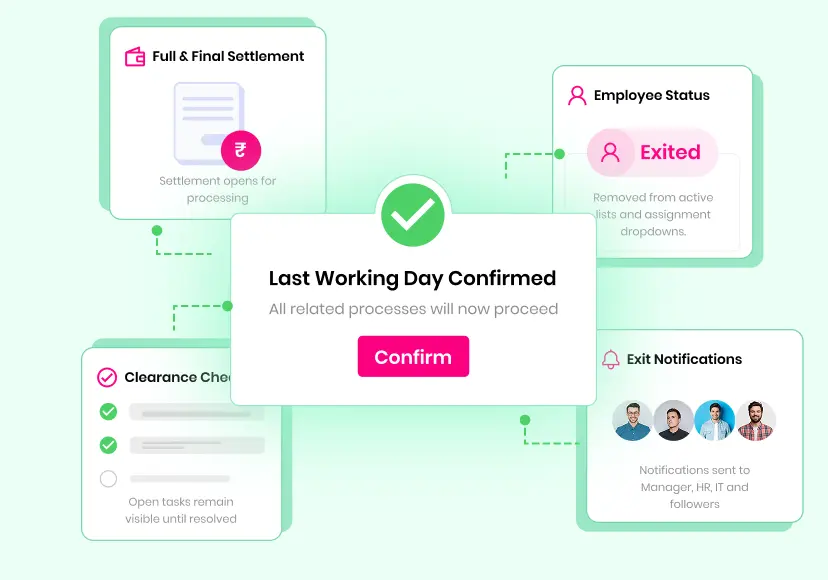
When the notice is served and the date has passed, HR confirms the actual last working day. It defaults to the planned date and can be adjusted if the final day moved. That single confirmation is what closes the employment record.
- The employee's status moves to Exited and drops out of active lists and assignment dropdowns.
- Clearance can be signed off, with open tasks still visible until resolved.
- The full & final settlement opens for processing.
- Exit notifications go to the manager, HR, IT and any followers you set.
Hand Over to Full and Final Settlement Automatically
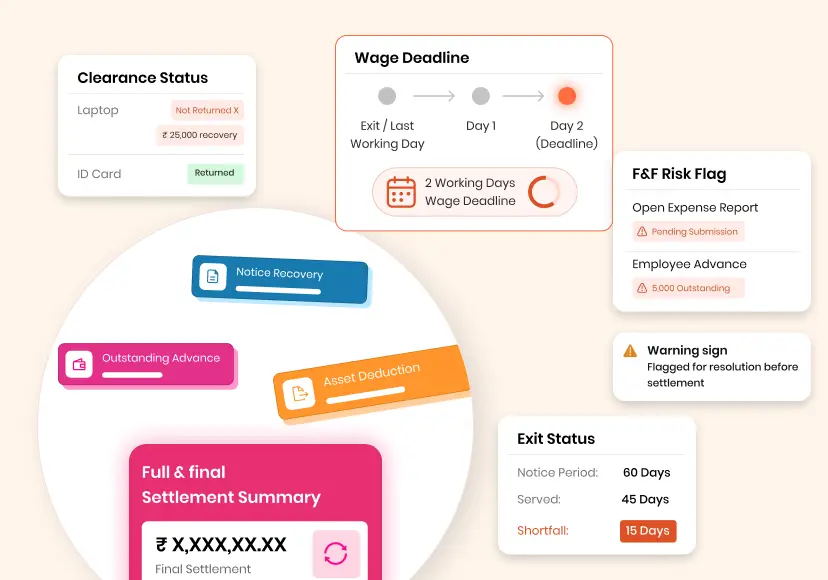
Offboarding doesn't end at the last working day. In QkrHR the full & final settlement opens on its own the moment the exit is confirmed, already carrying what offboarding found: notice served, leave left, assets not returned and advances still open.
- Notice shortfall comes straight from the exit record.
- Unreturned assets from clearance become asset deductions.
- Open expense reports and advances are flagged before the settlement can be processed.
- The two-working-day wage due date is shown from the first day.
2 days
Why the Exit Flow Has to Finish on Time
Under Section 17(2) of the Code on Wages, 2019, in force since 21 November 2025, wages due to a leaving employee are payable within two working days. Clearance and approvals that drag on past the last day now put that deadline at risk. This is a summary, not legal advice.
See the F&F rules under the Labour CodesWhy HR Teams Run Exits on QkrHR

One flow, start to finish
Application, approval, notice, clearance, last day and settlement share one record. No step starts from a spreadsheet.

Built for real exits
Planned resignations and sudden departures each have a flow that fits, and both end the same way.

Leave rules applied for you
Requests beyond the exit date and leave not allowed during notice are rejected without HR checking each one.

Deadlines on the screen
Wage and gratuity due dates show on every settlement and in Pending Actions.

Connected to payroll and expenses
Salary, loans, advances, claims and assets come into the settlement from their own modules, not retyped.

An audit trail for every exit
Who approved, who cleared what, who waived notice and why, and every status change on the settlement.
See an Employee Exit Run End to End
Bring one of your recent exits. We'll walk it through QkrHR, from the resignation to the final settlement, on your own policies.