Employee Management Software
Shift Planning That's Clear,
Flexible & Conflict-Free.
Stop redrawing rosters every week in Excel. QkrHR builds your shift schedules, assigns teams to plants and sites, calculates overtime and night allowances — and feeds it all directly to payroll.
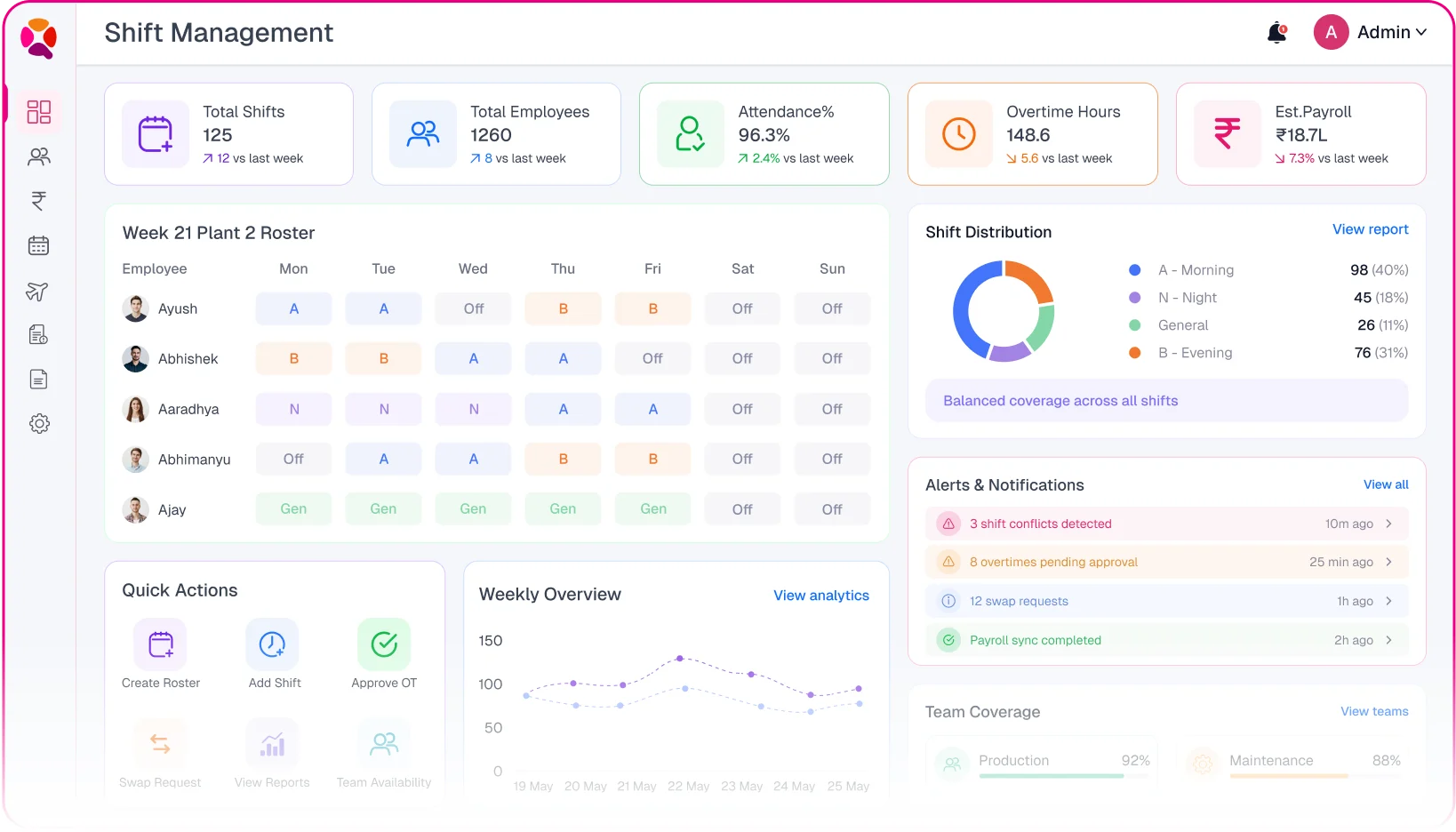














































QkrHR fixes all of this — in one flow
 Roster redrawn in Excelevery week
 Drag-and-drop roster grid, updated live
 Shift conflicts — two people, one post
 Conflict detection before the roster saves
 Overtime calculated by hand at month-end
 Overtime by shift rules, automatic to the minute
 Night allowance missed or keyed in wrong
 Night allowance calculated and pushed to payroll
 Shift swaps on WhatsApp, roster never updated
 Swap requests approved, roster updated instantly
 Attendance and payroll don't match the roster
 Attendance validated against shift, payroll flows
Set up shifts once Then let QkrHR run the floor
Every shift your operation runs, in one place
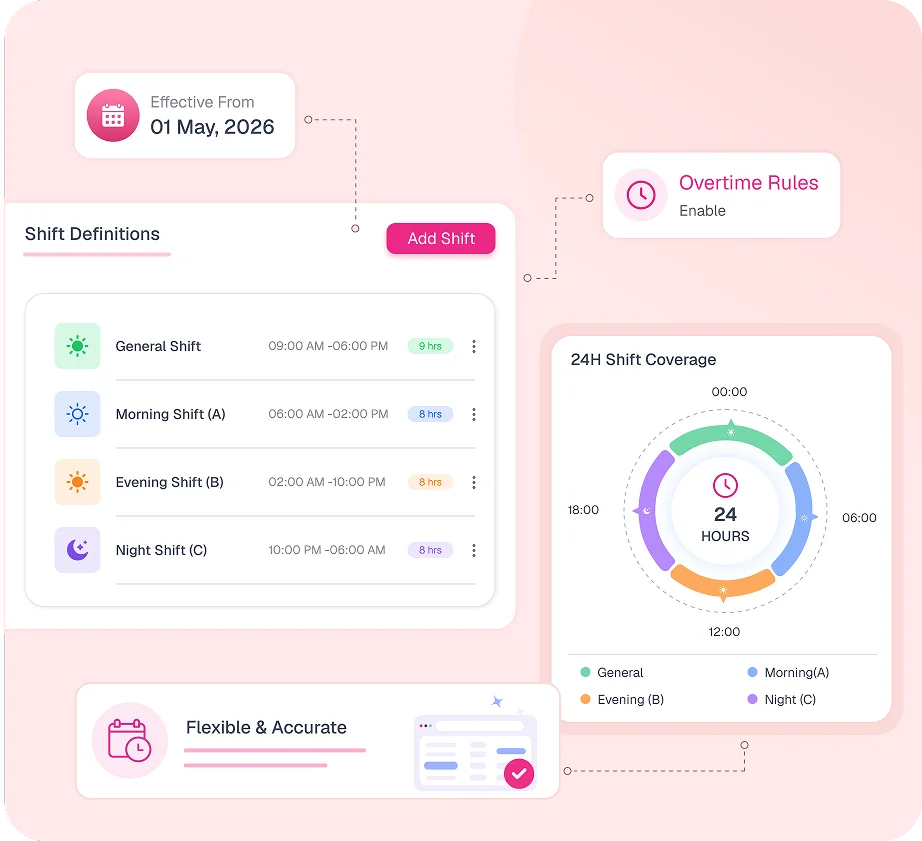
Set the name, start time, end time, break duration, and whether it crosses midnight. Each shift carries its own overtime threshold, allowance rules and attendance rounding settings.
- Standard shifts — General, Morning (A), Evening (B), Night (C) with exact timings.
- Cross-midnight shifts — night shifts that start and end on different calendar dates, handled correctly.
- Custom shifts — any start/end time, any break duration, any name your plant uses.
- Overtime threshold set per shift — hours beyond it trigger OT calculation automatically.

What is a shift management system?
A shift management system is software that defines work shift timings, builds weekly or monthly rosters, assigns employees to shifts, tracks attendance against those shifts, and calculates overtime and allowances. It replaces manual Excel rosters so shift planners build once and the system runs the floor.

What is a rotating shift?
A rotating shift is a work schedule where employees cycle through different shifts typically morning, evening and night on a repeating pattern. QkrHR builds rotating shift patterns once and applies them to a roster grid automatically, so each employee always knows their shift and each manager sees who's on which shift that day.
The roster isn't the problem Everything that happens around it is
Most shift pain shows up after you publish the roster — swaps that never get updated, overtime that's counted wrong, night allowances that get missed at payroll time.
The Old way
- A new Excel sheet drawn from scratch every week
- Swap requests on WhatsApp — the roster never reflects them
- Overtime tallied by hand from a biometric dump
- Night allowances keyed separately into payroll
- No live view of who's on which shift right now
The QkrHR Way
- Roster built once, extended week by week in the same grid
- Swap requests approved and roster updated in the same action
- Overtime calculated per shift rule, no manual counting
- Night allowances and differentials flow straight to payroll
- Live shift board — who's in, on which shift, right now
The real-world scenarios most scheduling tools can't handle
Indian manufacturing and service industries run complex shift arrangements. QkrHR has the controls built in, not bolted on.

Split Shifts
Define a shift with two separate work windows in the same day — morning block and afternoon block — with a gap in between.

Plant-Level Rosters
Separate rosters per plant, department or site — each with its own shift types, team assignments and coverage requirements.

Flexible & WFH Shifts
Define shifts for hybrid and remote staff with flexible windows, web punch-in and GPS-tagged mobile attendance.

On-Call & Relief Shifts
Assign on-call or relief shifts with a different OT rule — for staff covering gaps, emergencies or holiday relief.
Every role sees exactly what they need to run their shift
One platform, four clear lenses — employees, supervisors, plant HR and finance each see what drives their day.
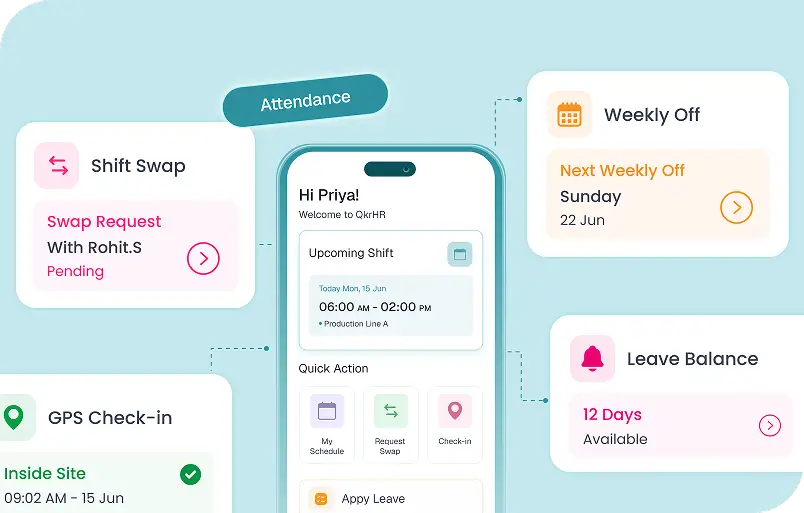
- See current and upcoming shift from the app
- Request shift swaps in self-service
- GPS check-in tied to shift assignment
- Know weekly offs and rest days in advance
Scales from one site to a hundred plants

Multi-plant
Independent rosters per plant or site, each with its own shift types and coverage rules.

Large teams
Hundreds of workers across A, B and N shifts — assigned in bulk by department or grade.

Hybrid & office
General and flexi shifts for office staff sitting alongside plant rosters in one view.

Field forces
GPS-tagged check-in tied to shift assignment and site geofence for on-road teams
Enterprise-grade shift controls, without enterprise complexity

Rotating shift patterns
3-team and 4-team cycles with automatic week-over-week rotation — no manual adjustment needed.

Late mark & early-out rules
Grace windows, rounding and late-mark thresholds configured per shift — applied to attendance automatically.

Night shift differential
Flat or percentage-based night allowance per shift type, pushed into payroll with full breakdowns.

Minimum rest period
Prevents scheduling a morning shift immediately after a night shift — enforced at roster-save.

Roster change history
Full audit trail of every roster edit — who changed what, when, and the previous assignment.

Roster export
Export any shift roster to Excel or PDF — for printing, compliance records or third-party systems.
Excel rosters, basic schedulers or QkrHR.
A scheduling tool tells people when to work. QkrHR makes sure the roster, attendance and payroll all agree.
| Capability | Excel / paper | Basic scheduler | QkrHR Shift |
|---|---|---|---|
| Rotating & fixed shift patterns | Manual | Fixed only | Both |
| Weekly roster grid — all staff, all shifts | Partial | Full grid | |
| Shift swap with roster auto-update | One approval | ||
| Overtime calculated per shift rule | By hand | By hand | Automatic |
| Night shift allowance to payroll | Manual | Direct | |
| Attendance validated against shift | Real-time | ||
| Multi-plant roster management | Limited | Full | |
| Glide data grid & approvals inbox | Exclusive |
Frequently Asked Questions
Haven't got your answer? Contact our support now
Shift Management Software helps to assign different types of shifts to all the employees. It is cost-effective, handy, and convenient to use. QkrHR's shift schedule software is seamlessly integrated with mobile and biometric devices.
Features of QkrHR shift management software
QkrHR’s shift scheduling software is designed to function smoothly in workforce planning by accommodating employee’s availability.
QkrHR shift scheduler software helps to manage complex shift patterns in a simpler way. Our Basic Features include:
Many organizations provide different kinds of shifts to their employees. Let’s make a complex shift schedule into an easier pattern with shift planning software. We make a centralized tool for better communication.
QkrHR shift scheduling tool offers:
Time is the key. QkrHR offers the best workforce shift software, which is cost-effective and easy to use. The QkrHR shift scheduling tool can manage various kinds of shifts.
Shift Scheduling Software focuses on creating and organizing shift schedules for the employees. It often includes tools for shift swapping and automated scheduling.
Shift management is a broader term and often integrates real-time updates, edits, on-the-go adjustments, and monitoring of shift-related activities. Shift Management Software helps to schedule shifts but also manage shifts after they're scheduled.