HR Document Management System

Every HR document, signed, current and easy to find

Manage all your HR documents in one place with QkrHR. Easily track policy acknowledgements, generate and send letters for digital signatures, and securely manage employee documents with HR verification and complete document tracking.
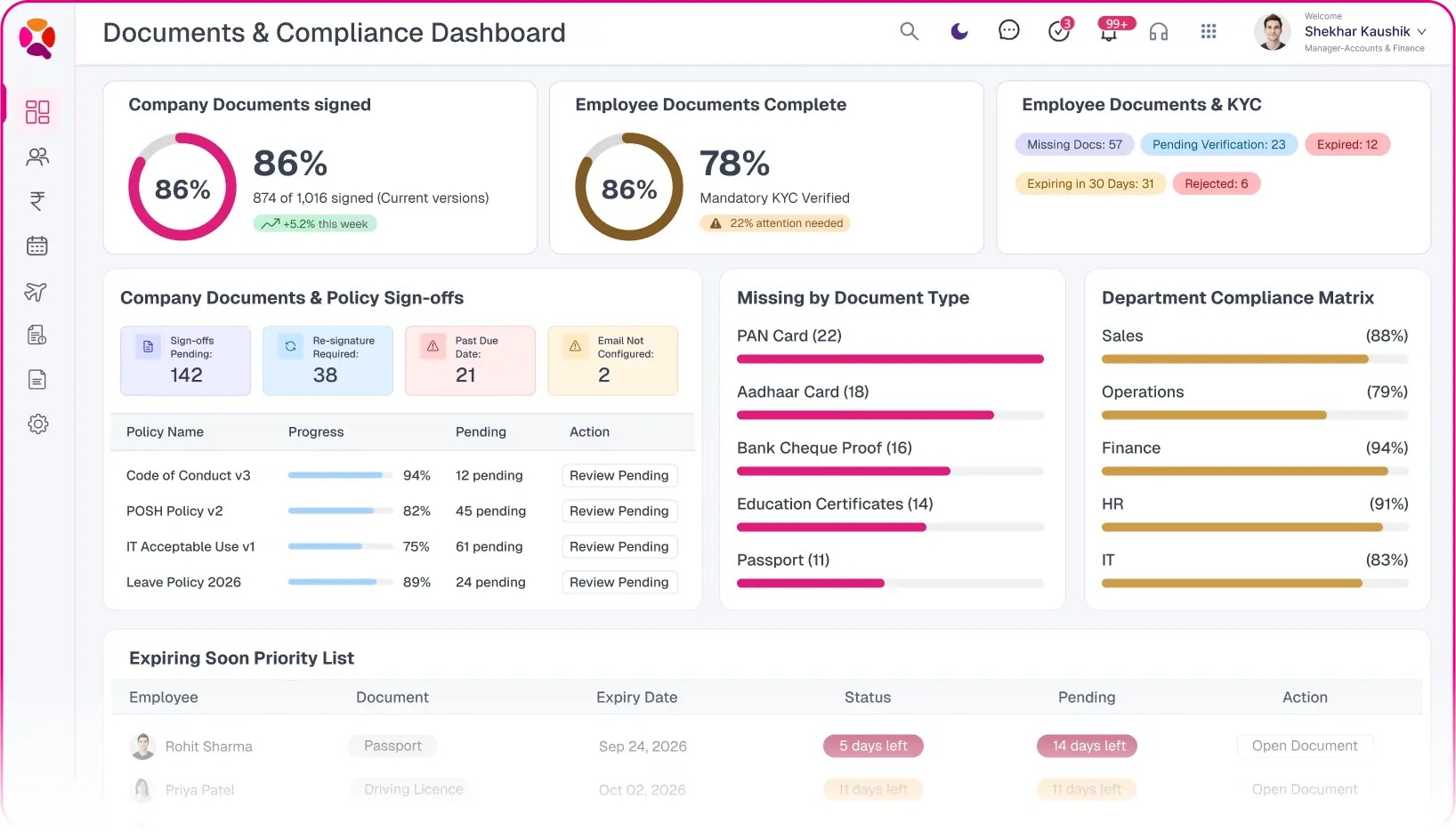

QkrHR company documents: policies with acknowledgement progress, a promotion letter signed by the HR Head, and an employee's PAN card verified by HR
Caravan Roadways Pvt. Ltd.
Niladri Buildcon Pvt. Ltd.
Fascent Pvt. Ltd.
Chatspark Pvt. Ltd.
Artboard
Pulsifin Finserve
Avosys Technology
Indian Institute of Technology Roorkee
Help a Child DRC
Pavaki Infrasolutions
iventus capital
Touchfinger Services LLP
Frank Nights
SRSG Broadcast India Pvt. Ltd.
GPS
KISSAN ENVIROCARE INDIA PRIVATE LIMITED
Capital Power Systems Ltd.
Nexgen Techtronics Private Limited
Shalimar Paints Ltd.
Bhanu Prakash Soap Work
Alacrit Retail Pvt. Ltd.
Vision Plus Global Services
Pousny Food and Beverages Pvt Ltd
Fire Solution
DSK Enterprises
Raj Group of industries
KD Electrical Pvt Ltd Industry- Electrical
Hitech Enviro Engineers
S K Enterprises Pvt. Ltd.
Indian Institute of Technology (BHU) Varanasi
Swastik Agro Products (MAHI MANGO)
Kingmaker Insence Stick
 Hindustan Herbal Pvt Ltd
Kothari Tek Solution Pvt. Ltd.
A Care Logistics
Alcostar Group
Ats
Basil Woods Junior
Daughter Nidhi
Oneness Network
Orgatek
Pahal
Regal Mep
Syandan
Thnxpe
Verify Shield
Company documents

Company documents

Policies, handbooks and forms in folders, each shared with exactly the people who should see it.

Employee files

Employee files

PAN, Aadhaar, certificates and past-employer papers, uploaded by employees and verified by HR.

My documents

My documents

Every employee sees their own documents and letters in one place, on the web and in the app.

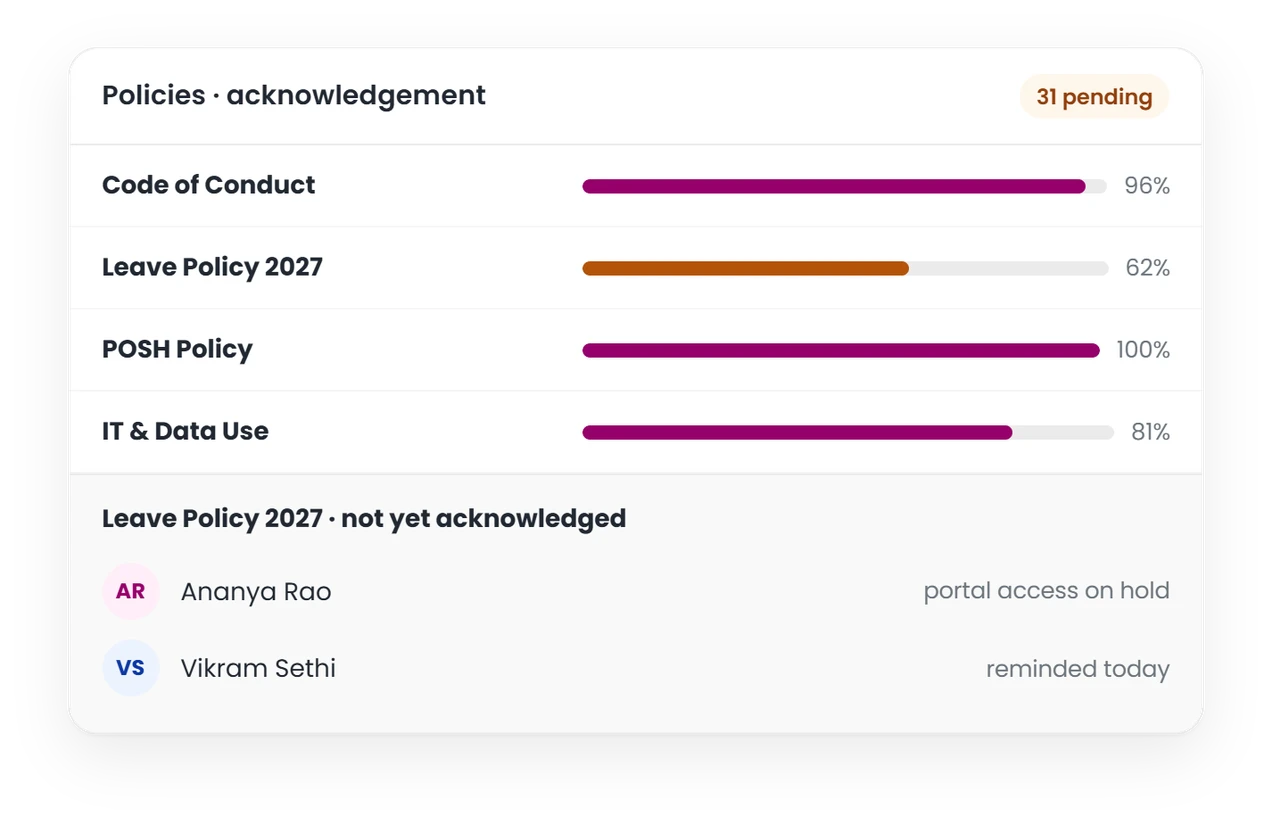
Policies & handbooks

“We changed the leave policy. Who still needs to sign?”

  • Turn on acknowledgement required. Employees acknowledge from the portal or the app, and you see who has and who hasn't.
  • For a critical policy, hold portal access until the employee acknowledges it.
Acknowledgement progress for four company policies, with the employees who have not yet acknowledged the leave policy
Letters

“I need 40 confirmation letters by Friday.”

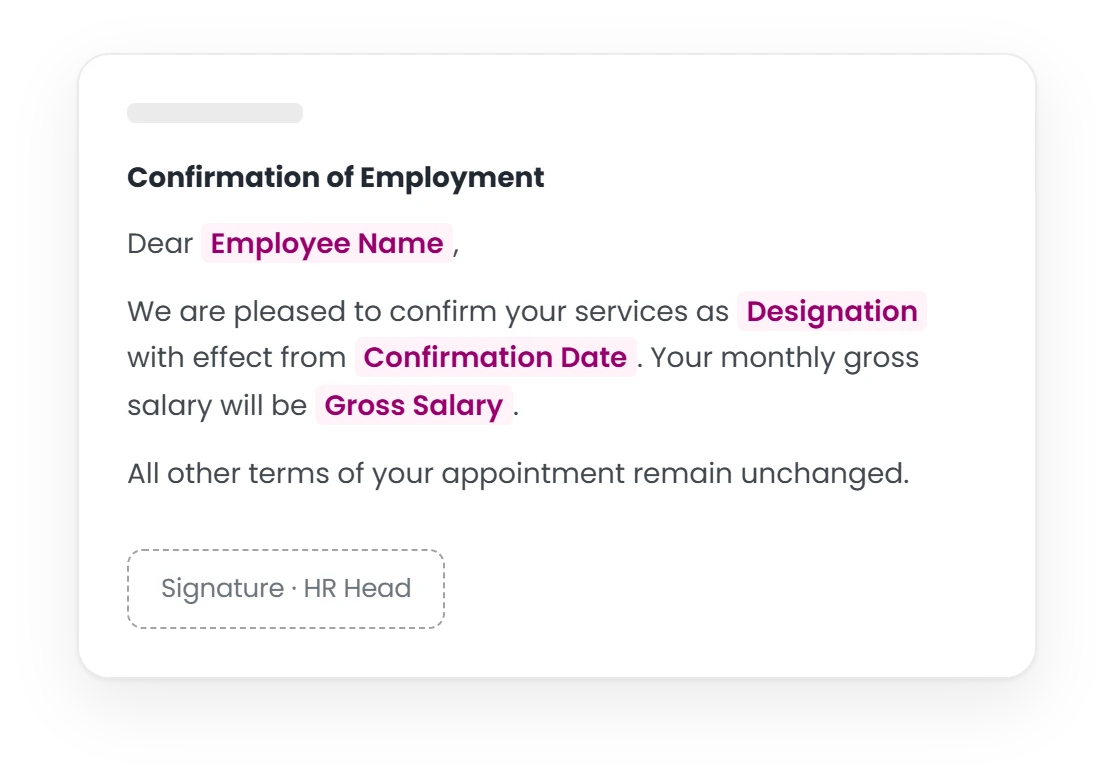
  • Letter templates fill themselves with employee details: name, designation, salary, dates and your own fields.
  • Generate, preview and email letters as PDFs. A copy stays on each employee's profile.
A confirmation letter template with employee fields that fill in automatically
Signatory approval

“The MD has to sign. Can it wait for them?”

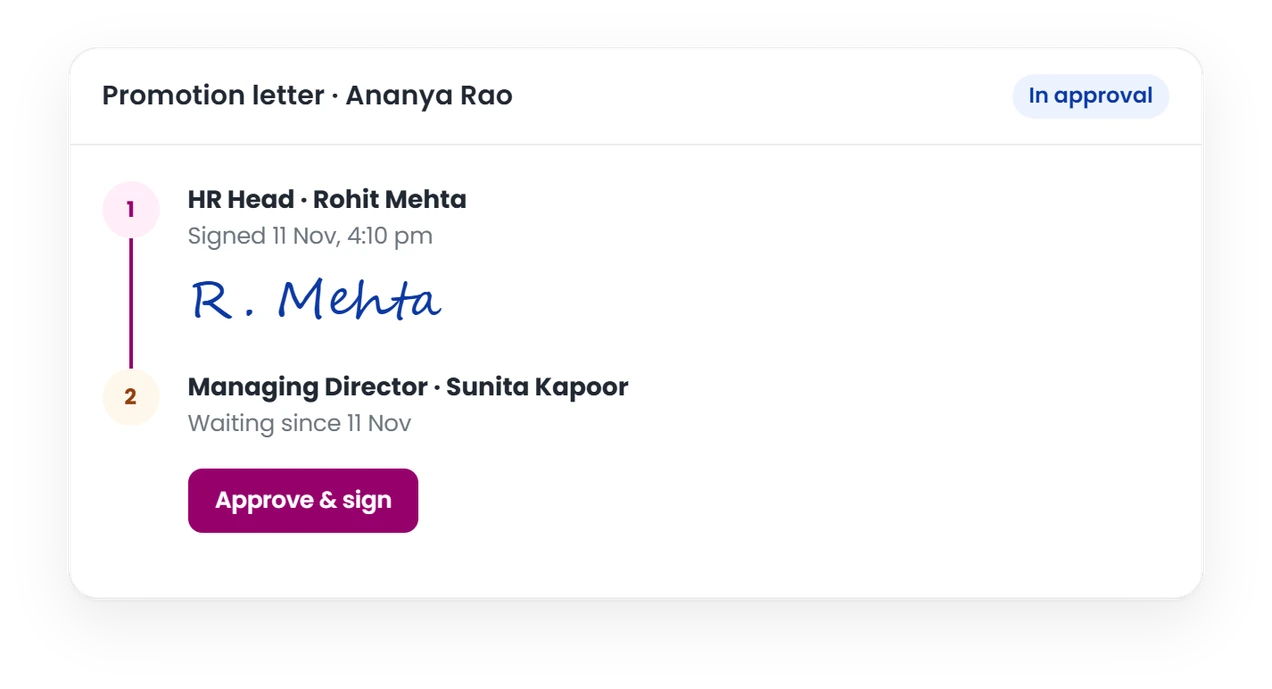
  • A template can carry up to two signatories. The letter goes to each in turn, through an approval workflow.
  • When a signatory approves, their signature is placed on the letter where you put it in the template.
A promotion letter signed by the HR Head and waiting for the Managing Director
Dinesh C. Gupta

My ERP software had to be easy to use & Intec Infonet Pvt. Ltd. made that happen for me! I am dedicatedly using this software for the past 2 years & not once have I encountered any problem. It also has an impeccable support team & that’s why I recommend it to others also.

Dinesh C. Gupta

Director of Capital Power Systems Ltd

Offer letters

“Did the candidate accept?”

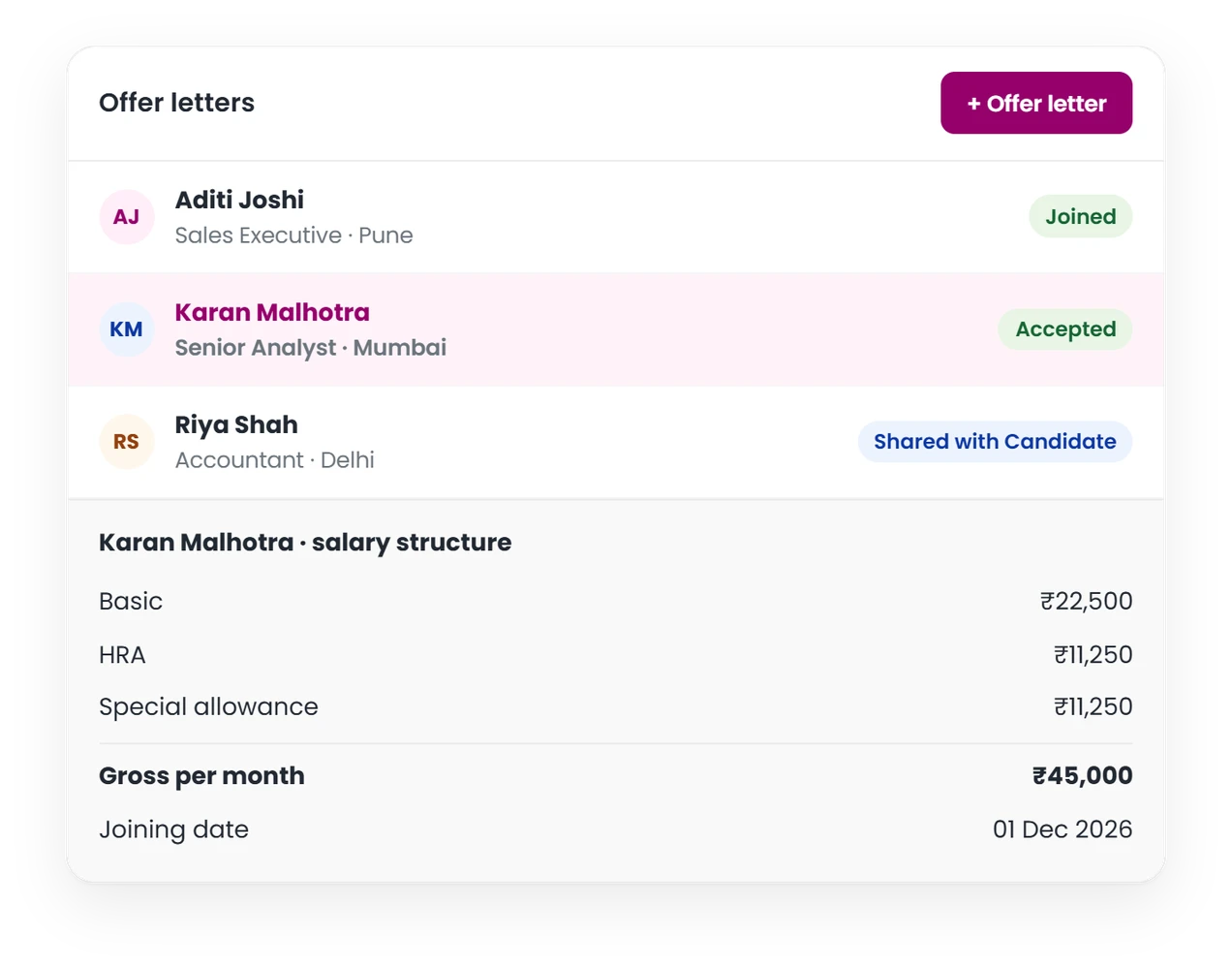
  • Issue offer letters with the salary structure built in, without waiting on the accounts team.
  • Track every offer from issued to joined, with joining dates and recruiters in one list, then carry on into onboarding.

Offer letters list with candidate status, and the salary structure of one offer
Employee files

“Whose PAN copy is missing?”

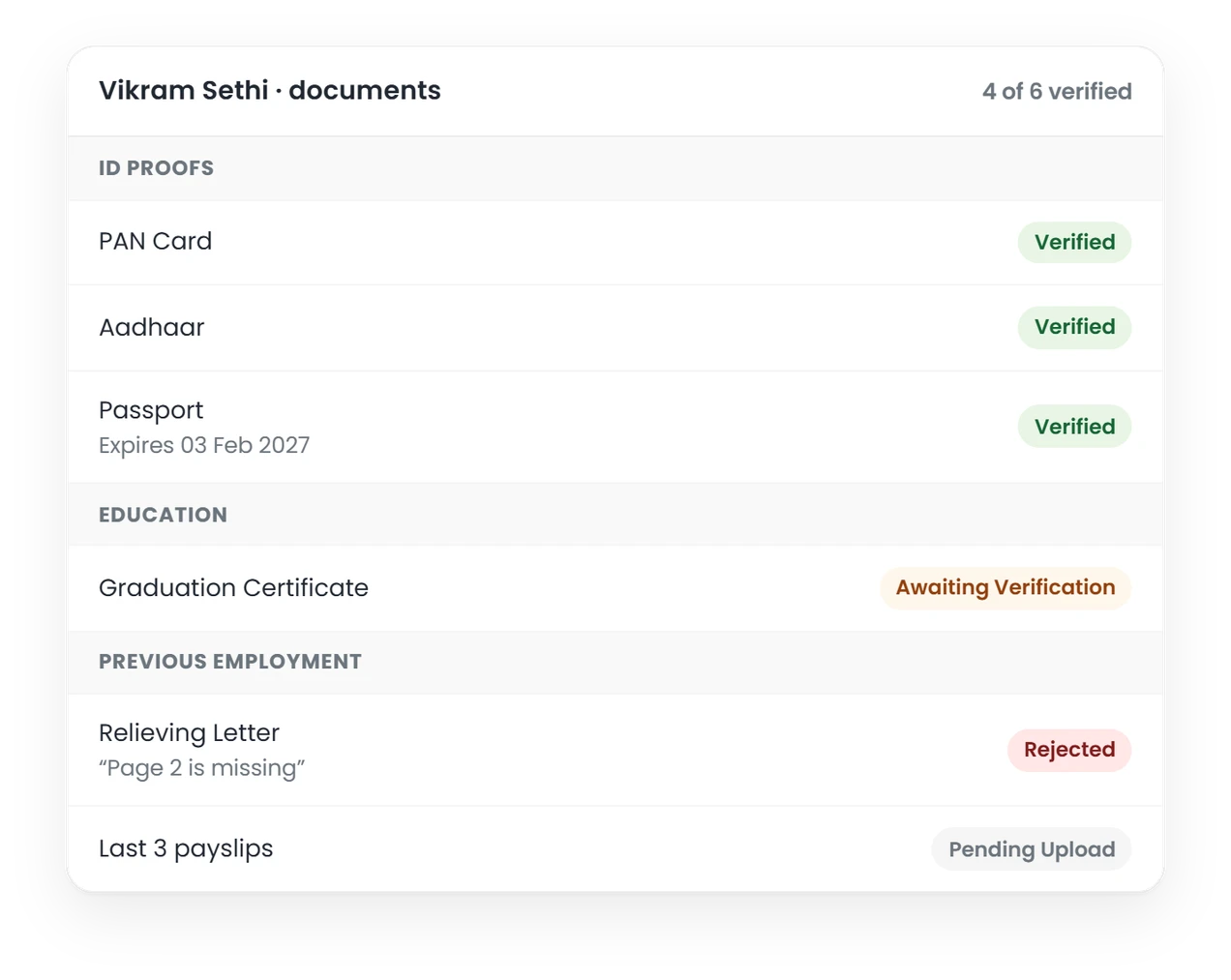
  • Set up document types with your own fields, expiry dates and mandatory rules.

  • Employees upload, and HR verifies or rejects with a remark.
  • Upload in bulk, with each file named by employee code.
  • Choose who sees each document type: the employee, their manager or HR only.
See employee records
An employee's documents grouped by folder, with verification status for each
Custom forms

“Collect exit interviews from everyone leaving this month.”
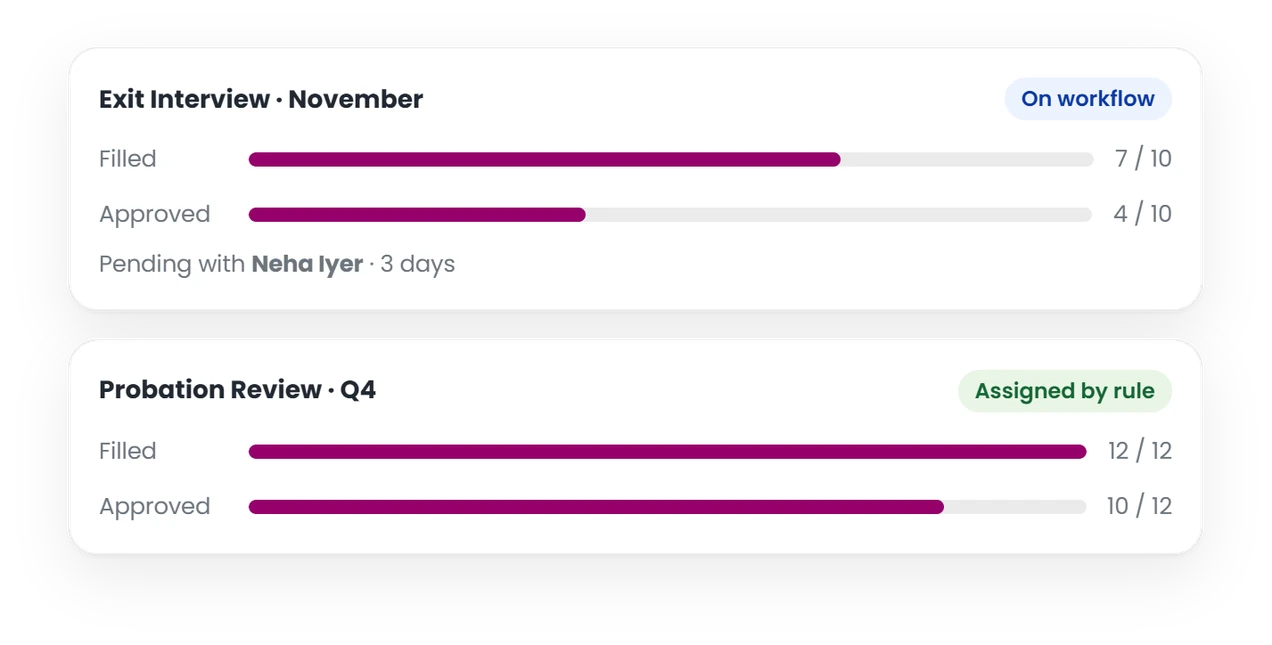
  • Design your own forms and assign them by hand or automatically by rule, for example an exit interview 15 days before the last working day.
  • Link a form to an approval, such as the end-of-probation review, with its own workflow.
  • See who has filled each form, who has approved it, and how long it has been waiting, alongside your other HR reports.
Two assigned forms showing how many employees have filled them and how many are approved

Questions HR teams ask

Haven't got your answer? Contact our support now

It keeps every HR document in one place: company policies and handbooks, letters you issue, and each employee's own documents. You decide who can see what, employees acknowledge the policies that need it, and letters go to your signatories for approval before they're issued.

A letter template can have up to two signatories. The letter goes to each of them in turn, and when a signatory approves, their signature is placed on the letter automatically.

You decide for each document type: the employee, their manager, HR or specific roles. Access follows the roles and data permissions you set in QkrHR.

Yes. Add an expiry date to any document type, such as a passport or driving licence, and it is recorded with each employee's upload.

Yes. Mark a document as acknowledgement required, and employees acknowledge it from the portal or the app. HR sees who has acknowledged and who hasn't, and can hold portal access until a critical policy is acknowledged.

Any letter you can write, including appointment, offer, confirmation, increment, promotion, transfer, experience, relieving and bank letters. Employee details such as name, designation, salary and dates fill in automatically.

Yes. Employees see their documents and letters under My Documents, on the web and in the mobile app, and upload the documents HR asks for through the self-service portal.

Yes. Company documents such as policies and handbooks sit in shared folders, and employee-specific documents such as contracts and certificates sit on each employee's record.

Bring one policy and one letter to the demo.

We'll set them up live, versioned and ready to sign, in under 30 minutes.